How to Rotate Annotation's Label in ChartView
Environment
| Product Version | Product | Author |
|---|---|---|
| 2020.2.616 | RadChartView for WinForms | Desislava Yordanova |
Description
RadChartView supports different annotation types. A common requirement is to rotate the label that the annotation shows:
Default annotation's label
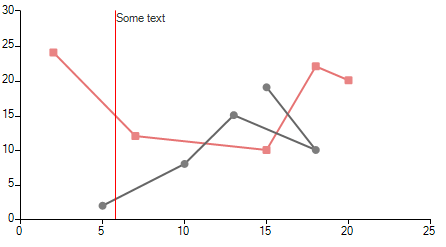
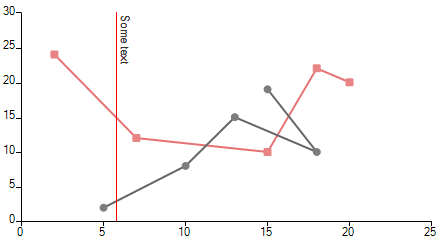
The desired orientation is to rotate the label so that multiple labels won't overlap if there are many annotations added to the chart:
Rotated annotation's label
Solution
Before populating RadChartView with data, it is necessary to subscribe to the CreateRenderer event and replace the default renderer with a custom one which is a derivative of CartesianRenderer.
You can control how the labels of the annotations are rendered by overriding the InitializeAnnotations method and replacing the respective DrawPart method according to the used annotation type.
You can find below a sample code snippet demonstrating how to replace the default CartesianGridLineAnnotationDrawPart and achieve the illustrated result from the above screenshot:
Rotate the label of a CartesianGridLineAnnotation
public RadForm1()
{
    InitializeComponent();

    this.radChartView1.CreateRenderer += radChartView1_CreateRenderer;

    ScatterLineSeries scatterSeries = new ScatterLineSeries();
    scatterSeries.DataPoints.Add(new ScatterDataPoint(15, 19));
    scatterSeries.DataPoints.Add(new ScatterDataPoint(18, 10));
    scatterSeries.DataPoints.Add(new ScatterDataPoint(13, 15));
    scatterSeries.DataPoints.Add(new ScatterDataPoint(10, 8));
    scatterSeries.DataPoints.Add(new ScatterDataPoint(5, 2));
    scatterSeries.PointSize = new SizeF(8, 8);
    this.radChartView1.Series.Add(scatterSeries);
    ScatterLineSeries scatterSeries2 = new ScatterLineSeries();
    scatterSeries2.DataPoints.Add(new ScatterDataPoint(2, 24));
    scatterSeries2.DataPoints.Add(new ScatterDataPoint(7, 12));
    scatterSeries2.DataPoints.Add(new ScatterDataPoint(15, 10));
    scatterSeries2.DataPoints.Add(new ScatterDataPoint(18, 22));
    scatterSeries2.DataPoints.Add(new ScatterDataPoint(20, 20));
    scatterSeries2.Shape = new RoundRectShape(1);
    scatterSeries2.PointSize = new SizeF(8, 8);
    this.radChartView1.Series.Add(scatterSeries2);

    CartesianGridLineAnnotation annotation1 = new CartesianGridLineAnnotation();
    annotation1.Axis = this.radChartView1.Axes[0] as CartesianAxis;
    annotation1.Value = 5.8;
    annotation1.Label = "Some text";
    annotation1.DrawMode = AnnotationDrawMode.AboveSeries;
    annotation1.BorderColor = Color.Red;
    annotation1.BorderDashStyle = DashStyle.Solid;
    annotation1.BorderWidth = 1;
    this.radChartView1.Annotations.Add(annotation1);
}

private void radChartView1_CreateRenderer(object sender, ChartViewCreateRendererEventArgs e)
{
    e.Renderer = new CustomRenderer(e.Area as CartesianArea);
}

public class CustomRenderer : CartesianRenderer
{
    public CustomRenderer(CartesianArea area) : base(area)
    {
    }

    protected override void InitializeAnnotations(AnnotationDrawMode drawMode)
    {
        for (int i = 0; i < this.Area.Annotations.Count; i++)
        {
            if (this.Area.Annotations[i] is CartesianGridLineAnnotation && this.Area.Annotations[i].DrawMode == drawMode)
            {
                this.DrawParts.Add(new CustomCartesianGridLineAnnotationDrawPart(this.Area.Annotations[i] as CartesianGridLineAnnotation, this));
            }
        }
    }
}

public class CustomCartesianGridLineAnnotationDrawPart : CartesianGridLineAnnotationDrawPart
{
    public CustomCartesianGridLineAnnotationDrawPart(CartesianGridLineAnnotation element, CartesianRenderer renderer) : base(element, renderer)
    {
    }

    public override void Draw()
    {
        FieldInfo fi = typeof(CartesianGridLineAnnotation).GetField("model", BindingFlags.Instance | BindingFlags.NonPublic);
        ChartAnnotationModel model = fi.GetValue(this.Element) as ChartAnnotationModel;
        RectangleF rect = ChartRenderer.ToRectangleF(model.LayoutSlot);
        rect.Offset(this.ViewportOffsetX, this.ViewportOffsetY);

        Graphics graphics = this.Renderer.Surface as Graphics;
        RadGdiGraphics radGraphics = new RadGdiGraphics(graphics);

        Rectangle clipRect = ChartRenderer.ToRectangle(this.Element.View.GetArea<CartesianArea>().AreaModel.PlotArea.LayoutSlot);
        clipRect.Offset((int)this.ViewportOffsetX, (int)this.ViewportOffsetY);
        graphics.SetClip(clipRect);

        GraphicsPath path = new GraphicsPath();
        path.AddLine(rect.Location, new PointF(rect.Right, rect.Bottom));

        BorderPrimitiveImpl border = new BorderPrimitiveImpl(this.Element, null);
        border.PaintBorder(radGraphics, null, path, rect);

        rect.Size = graphics.MeasureString(this.Element.Label, this.Element.Font);
        rect.Offset(this.Element.PositonOffset.Width + 1, this.Element.PositonOffset.Height + 1);

        TextParams tp = new TextParams();
        tp.textOrientation = Orientation.Vertical;
        tp.font = this.Element.Font;
        tp.foreColor = this.Element.ForeColor;
        tp.paintingRectangle = new RectangleF(rect.X, rect.Y, rect.Height, rect.Width);
        tp.text = this.Element.Label;

        FillPrimitiveImpl fill = new FillPrimitiveImpl(this.Element, null);
        fill.PaintFill(radGraphics, null, rect);

        radGraphics.DrawString(tp, new SizeF(rect.Height, rect.Width));
    }
}
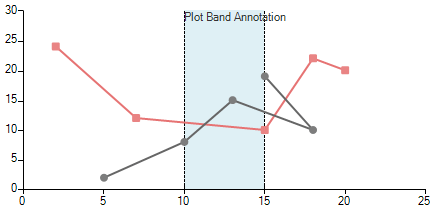
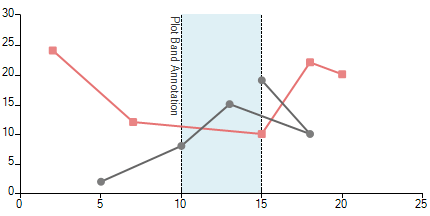
In a similar way you can rotate the label for the CartesianPlotBandAnnotation as well.
Default annotation's label
Rotated annotation's label
Rotate the label of a CartesianPlotBandAnnotation
public RadForm1()
{
    InitializeComponent();
    this.radChartView1.CreateRenderer += radChartView1_CreateRenderer;

    ScatterLineSeries scatterSeries = new ScatterLineSeries();
    scatterSeries.DataPoints.Add(new ScatterDataPoint(15, 19));
    scatterSeries.DataPoints.Add(new ScatterDataPoint(18, 10));
    scatterSeries.DataPoints.Add(new ScatterDataPoint(13, 15));
    scatterSeries.DataPoints.Add(new ScatterDataPoint(10, 8));
    scatterSeries.DataPoints.Add(new ScatterDataPoint(5, 2));
    scatterSeries.PointSize = new SizeF(8, 8);
    this.radChartView1.Series.Add(scatterSeries);
    ScatterLineSeries scatterSeries2 = new ScatterLineSeries();
    scatterSeries2.DataPoints.Add(new ScatterDataPoint(2, 24));
    scatterSeries2.DataPoints.Add(new ScatterDataPoint(7, 12));
    scatterSeries2.DataPoints.Add(new ScatterDataPoint(15, 10));
    scatterSeries2.DataPoints.Add(new ScatterDataPoint(18, 22));
    scatterSeries2.DataPoints.Add(new ScatterDataPoint(20, 20));
    scatterSeries2.Shape = new RoundRectShape(1);
    scatterSeries2.PointSize = new SizeF(8, 8);
    this.radChartView1.Series.Add(scatterSeries2);

    CartesianPlotBandAnnotation annotation1 = new CartesianPlotBandAnnotation();
    annotation1.Axis = this.radChartView1.Axes[0] as CartesianAxis;
    annotation1.DrawMode = AnnotationDrawMode.BelowSeries;
    annotation1.Label = "Plot Band Annotation";
    annotation1.From = 10;
    annotation1.To = 15;
    annotation1.BackColor = Color.FromArgb(100, Color.LightBlue);
    annotation1.BorderColor = Color.Black;
    annotation1.BorderWidth = 1;
    this.radChartView1.Annotations.Add(annotation1);
}

void radChartView1_CreateRenderer(object sender, ChartViewCreateRendererEventArgs e)
        {
            e.Renderer = new CustomRenderer(e.Area as CartesianArea);
        }

public class CustomRenderer : CartesianRenderer
{
    public CustomRenderer(CartesianArea area) : base(area)
            {
            }

    protected override void InitializeAnnotations(AnnotationDrawMode drawMode)
    {
        for (int i = 0; i < this.Area.Annotations.Count; i++)
        {
            if (this.Area.Annotations[i] is CartesianPlotBandAnnotation && this.Area.Annotations[i].DrawMode == drawMode)
            {
                this.DrawParts.Add(new CustomCartesianPlotBandAnnotationDrawPart(this.Area.Annotations[i] as CartesianPlotBandAnnotation, this));
            }
        }
    }
}

public class CustomCartesianPlotBandAnnotationDrawPart : CartesianPlotBandAnnotationDrawPart
{
    public CustomCartesianPlotBandAnnotationDrawPart(CartesianPlotBandAnnotation element, CartesianRenderer renderer) : base(element, renderer)
            {
            }

    public override void Draw()
    {
        Graphics graphics = this.Renderer.Surface as Graphics;
        RadGdiGraphics radGraphics = new RadGdiGraphics(graphics);
        FieldInfo fi = typeof(CartesianPlotBandAnnotation).GetField("model", BindingFlags.Instance | BindingFlags.NonPublic);
        ChartAnnotationModel model = fi.GetValue(this.Element) as ChartAnnotationModel;
        if (this.Element.ClipToPlotArea)
        {
            Rectangle plotArea = ChartRenderer.ToRectangle(this.Element.View.GetArea<CartesianArea>().AreaModel.PlotArea.LayoutSlot);
            plotArea.Offset((int)this.ViewportOffsetX, (int)this.ViewportOffsetY);
            graphics.SetClip(plotArea);
        }

        RectangleF rect = ChartRenderer.ToRectangleF(model.LayoutSlot);
        rect.Offset(this.ViewportOffsetX, this.ViewportOffsetY);

        GraphicsPath path = new GraphicsPath();
        path.AddRectangle(rect);

        FillPrimitiveImpl fill = new FillPrimitiveImpl(this.Element, null);
        fill.PaintFill(radGraphics, path, rect);

        CartesianArea area = this.Element.View.GetArea<CartesianArea>();
        path = new GraphicsPath();

        if ((area.Orientation == Orientation.Vertical && this.Element.Axis.AxisType == Telerik.Charting.AxisType.First) ||
            (area.Orientation == Orientation.Horizontal && this.Element.Axis.AxisType == Telerik.Charting.AxisType.Second))
        {
            path.AddLine(rect.X, rect.Y, rect.X, rect.Bottom);
            path.CloseFigure();
            path.AddLine(rect.Right, rect.Y, rect.Right, rect.Bottom);
            path.CloseFigure();
        }
        else
        {
            path.AddLine(rect.X, rect.Y, rect.Right, rect.Y);
            path.CloseFigure();
            path.AddLine(rect.X, rect.Bottom, rect.Right, rect.Bottom);
            path.CloseFigure();
        }

        BorderPrimitiveImpl border = new BorderPrimitiveImpl(this.Element, null);
        border.PaintBorder(radGraphics, null, path, rect);

        rect.Offset(this.Element.PositonOffset.Width, this.Element.PositonOffset.Height);

        TextParams tp = new TextParams();
        tp.textOrientation = Orientation.Vertical;
        tp.font = this.Element.Font;
        tp.foreColor = this.Element.ForeColor;
        tp.paintingRectangle = new RectangleF(rect.X - rect.Height, rect.Y, rect.Height, rect.Height);
        tp.text = this.Element.Label;

        radGraphics.DrawString(tp, new SizeF(rect.Height, rect.Width));

        if (this.Element.ClipToPlotArea)
        {
            graphics.ResetClip();
        }
    }
}
Note that this is just a sample approach and it may not cover all possible cases. Feel free to modify and extend the example in a way which suits your custom requirement best.