New to Telerik UI for WinForms? Start a free 30-day trial
Annotations
Updated over 1 year ago
Annotations are visual elements that can be used to highlight certain areas on the plot area and denote significant values.
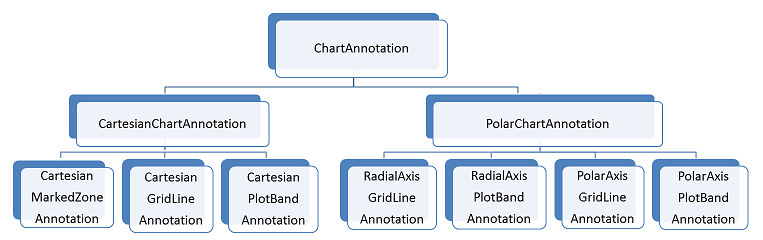
RadChartView provides the following types of annotations:
-
Cartesian grid line
-
Cartesian plot band
-
Cartesian marked zone
-
Polar axis grid line (associated with the polar axis)
-
Polar axis plot band (associated with the polar axis)
-
Polar axis grid line (associated with the radial axis)
-
Radial axis plot band (associated with the radial axis)
Figure 1: Chart Annotations
Common Properties
| Property | Description |
|---|---|
| ClipToPlotArea | Gets or sets a value indicating whether this instance will be clipped to the bounds of the plot area. |
| DrawMode | Gets or sets a value indicating the position of the annotation in the chart draw stack. |
| PositonOffset | Gets or sets the offset of the label of the annotations in pixels. |
Draw Mode
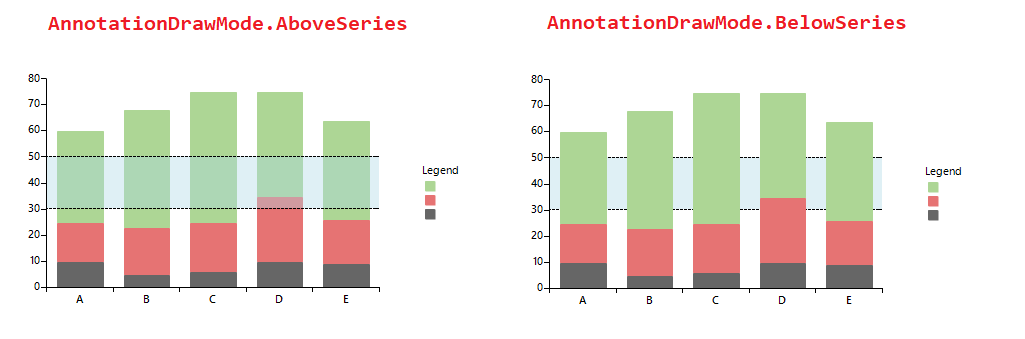
The DrawMode property indicates whether the annotation should be drawn above the data points or beneath them.
Figure 2: Annotations Draw Mode