RadChartView Drag and Drop
| Product Version | Product | Author | Last modified |
|---|---|---|---|
| Q2 2013 | RadChartView for WinForms | Dimitar Karamfilov | 09/13/2013 |
PROBLEM
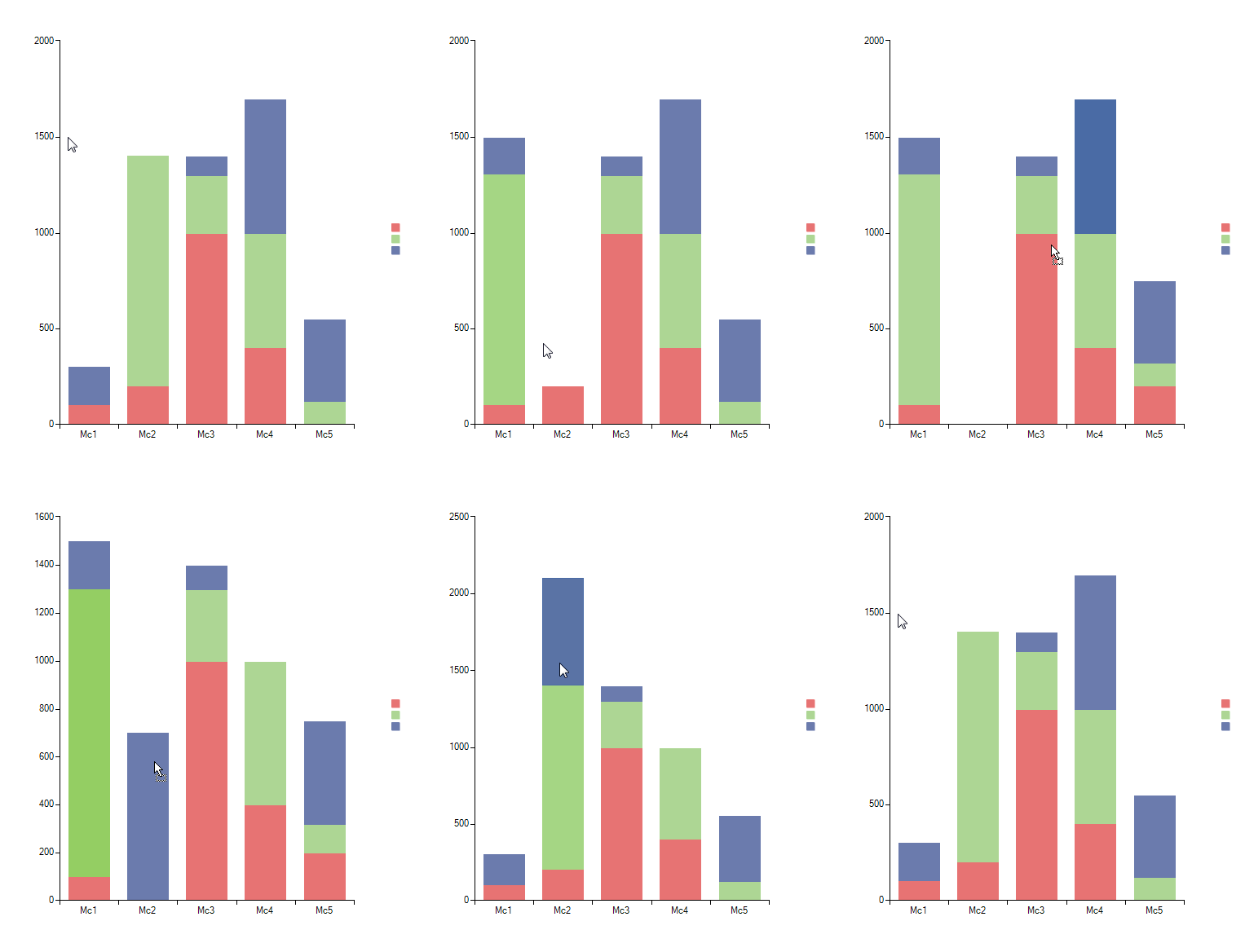
This article demonstrates how to implement drag and drop functionality in RadChartView. This will allow the user to move data points from one category to another.
SOLUTION
First we will populate RadChartView with some data. In each category we have a single data point with value of 0. This is needed because all categories must remain visible despite there is no actual data in them:
BarSeries bar = new BarSeries();
bar.Name = "FakeSeries";
bar.CombineMode = ChartSeriesCombineMode.Stack;
CategoricalDataPoint point = new CategoricalDataPoint();
point.Category = "Mc1";
point.Value = 0;
bar.DataPoints.Add(point);
point = new CategoricalDataPoint();
point.Category = "Mc2";
point.Value = 0;
bar.DataPoints.Add(point);
point = new CategoricalDataPoint();
point.Category = "Mc3";
point.Value = 0;
bar.DataPoints.Add(point);
point = new CategoricalDataPoint();
point.Category = "Mc4";
point.Value = 0;
bar.DataPoints.Add(point);
point = new CategoricalDataPoint();
point.Category = "Mc5";
point.Value = 0;
bar.DataPoints.Add(point);

this.radChartView1.Series.Add(bar);
bar.IsVisibleInLegend = false;

bar = new BarSeries();
bar.Name = "Series1";
bar.CombineMode = ChartSeriesCombineMode.Stack;

point = new CategoricalDataPoint();
point.Category = "Mc1";
point.Value = 100;
bar.DataPoints.Add(point);
point = new CategoricalDataPoint();
point.Category = "Mc2";
point.Value = 200;
bar.DataPoints.Add(point);
point = new CategoricalDataPoint();
point.Category = "Mc3";
point.Value = 1000;
bar.DataPoints.Add(point);
point = new CategoricalDataPoint();
point.Category = "Mc4";
point.Value = 400;
bar.DataPoints.Add(point);

this.radChartView1.Series.Add(bar);

bar = new BarSeries();
bar.Name = "Series2";
bar.CombineMode = ChartSeriesCombineMode.Stack;

point = new CategoricalDataPoint();
point.Category = "Mc2";
point.Value = 1200;
bar.DataPoints.Add(point);
point = new CategoricalDataPoint();
point.Category = "Mc3";
point.Value = 300;
bar.DataPoints.Add(point);
point = new CategoricalDataPoint();
point.Category = "Mc4";
point.Value = 600;
bar.DataPoints.Add(point);
point = new CategoricalDataPoint();
point.Category = "Mc5";
point.Value = 120;
bar.DataPoints.Add(point);

this.radChartView1.Series.Add(bar);

bar = new BarSeries();
bar.Name = "Series3";
bar.CombineMode = ChartSeriesCombineMode.Stack;

point = new CategoricalDataPoint();
point.Category = "Mc1";
point.Value = 200;
bar.DataPoints.Add(point);
point = new CategoricalDataPoint();
point.Category = "Mc3";
point.Value = 100;
bar.DataPoints.Add(point);
point = new CategoricalDataPoint();
point.Category = "Mc4";
point.Value = 700;
bar.DataPoints.Add(point);
point = new CategoricalDataPoint();
point.Category = "Mc5";
point.Value = 430;
bar.DataPoints.Add(point);
Then you should subscribe to the MouseDown, DragDrop and DragOver events and also we need to enable the drop functionality for the RadChartView:
this.radChartView1.AllowDrop = true;
this.radChartView1.MouseDown += radChartView1_MouseDown;
this.radChartView1.DragDrop += radChartView1_DragDrop;
this.radChartView1.DragOver += radChartView1_DragOver;
In the MouseDown event handler we need to check if the mouse is over a valid for dragging point (data point) and if it is we can perform the drag operation:
private void radChartView1_MouseDown(object sender, MouseEventArgs e)
{
    CategoricalDataPoint point = ((BarSeries)this.radChartView1.Series[0]).HitTest(e.X, e.Y) as CategoricalDataPoint;

    if (point != null)
    {
        this.radChartView1.DoDragDrop(point, DragDropEffects.Move);
    }
}
In the DragOver event handler we are preserving the move effect if the user is dragging the appropriate datatype:
void radChartView1_DragOver(object sender, DragEventArgs e)
{
    if (e.Data.GetDataPresent(typeof(CategoricalDataPoint)))
    {
        e.Effect = DragDropEffects.Move;
    }
}
Finally, we need to implement the DragDrop event handler where we are actually updating the RadChartView in order to respond to the drag and drop operation. We are checking if the mouse is over a valid drop location and then we are cloning the data points, adding it to the new series and deleting it from the old one:
void radChartView1_DragDrop(object sender, DragEventArgs e)
{
    CategoricalDataPoint point = e.Data.GetData(typeof(CategoricalDataPoint)) as CategoricalDataPoint;

    if (point != null)
    {
        CategoricalDataPoint dropPoint = null;
        Point dropLocation = this.radChartView1.PointToClient(new Point(e.X, e.Y));

        dropPoint = this.radChartView1.Series[0].HitTest(dropLocation.X, dropLocation.Y) as CategoricalDataPoint;

        if (dropPoint == null)
        {
            for (int i = 0; i < this.radChartView1.Bounds.Bottom; i++)
            {
                dropPoint = this.radChartView1.Series[0].HitTest(dropLocation.X, i) as CategoricalDataPoint;

                if (dropPoint!= null)
                {
                    break;
                }
            }
        }

        if (dropPoint != null)
        {
            BarSeries barSeries = point.Parent.Presenter as BarSeries;

            CategoricalDataPoint clone = new CategoricalDataPoint();
            clone.Category = dropPoint.Category;
            clone.Value = point.Value;
            barSeries.DataPoints.Add(clone);
            barSeries.DataPoints.Remove(point);
        }
    }
}