New to Telerik UI for WinForms? Start a free 30-day trial
How to Print RadBarcode
Updated on Nov 3, 2025
Environment
| Product Version | Product | Author |
|---|---|---|
| 2020.1.218 | RadBarcode for WinForms | Desislava Yordanova |
Description
RadBarcode doesn't support printing out of the box. However, it offers exporting to image functionality.
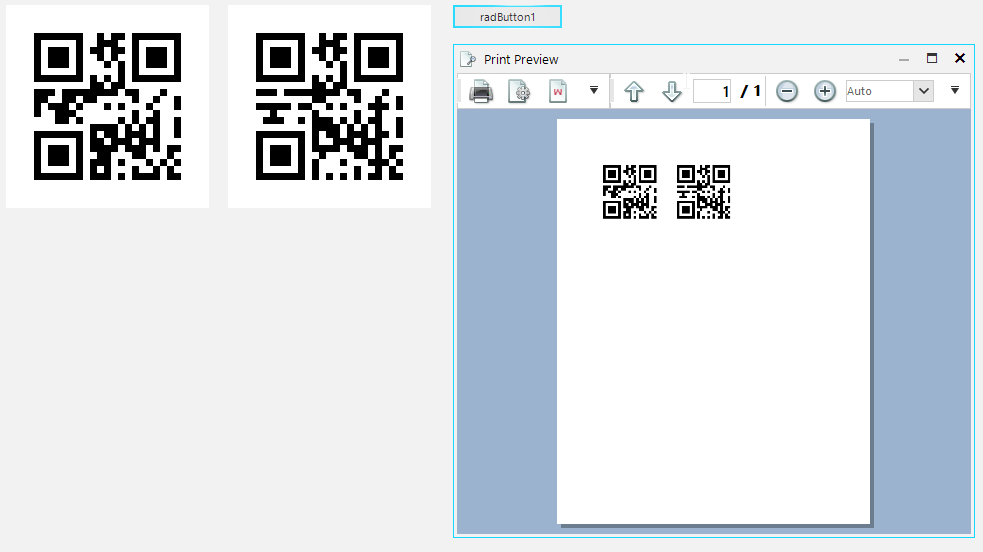
This article demonstrates how to get benefit from the RadRichTextEditor's printing behavior and achieve printing RadBarcode.
Solution
Once you have the exported bar code images, you can insert them in RadRichTextEditor and then print the RadDocument:
C#
string fileName1 = @"..\..\img1.png";
string fileName2 = @"..\..\img2.png";
Image img = this.radBarcode1.ExportToImage();
img.Save(fileName1, System.Drawing.Imaging.ImageFormat.Png);
Image img2 = this.radBarcode2.ExportToImage();
img2.Save(fileName2, System.Drawing.Imaging.ImageFormat.Png);

RadRichTextEditor radRichTextEditor1 = new RadRichTextEditor();
radRichTextEditor1.LoadElementTree();
Stream stream = File.Open(fileName1, FileMode.Open);
string extension = Path.GetExtension(fileName1);
radRichTextEditor1.InsertImage(stream, extension);

Stream stream2 = File.Open(fileName2, FileMode.Open);
extension = Path.GetExtension(fileName2);
radRichTextEditor1.InsertImage(stream2, extension);
radRichTextEditor1.PrintPreview();