New to Telerik UI for WinForms? Start a free 30-day trial
How to Paste a Single Value to All Selected Cells in RadGridView
Updated on Aug 27, 2026
Environment
| Product Version | Product | Author |
|---|---|---|
| 2019.1.219 | RadGridView for WinForms | Desislava Yordanova |
Description
This article aims to show you a sample approach how you can paste a single value to all selected cells in RadGridView.
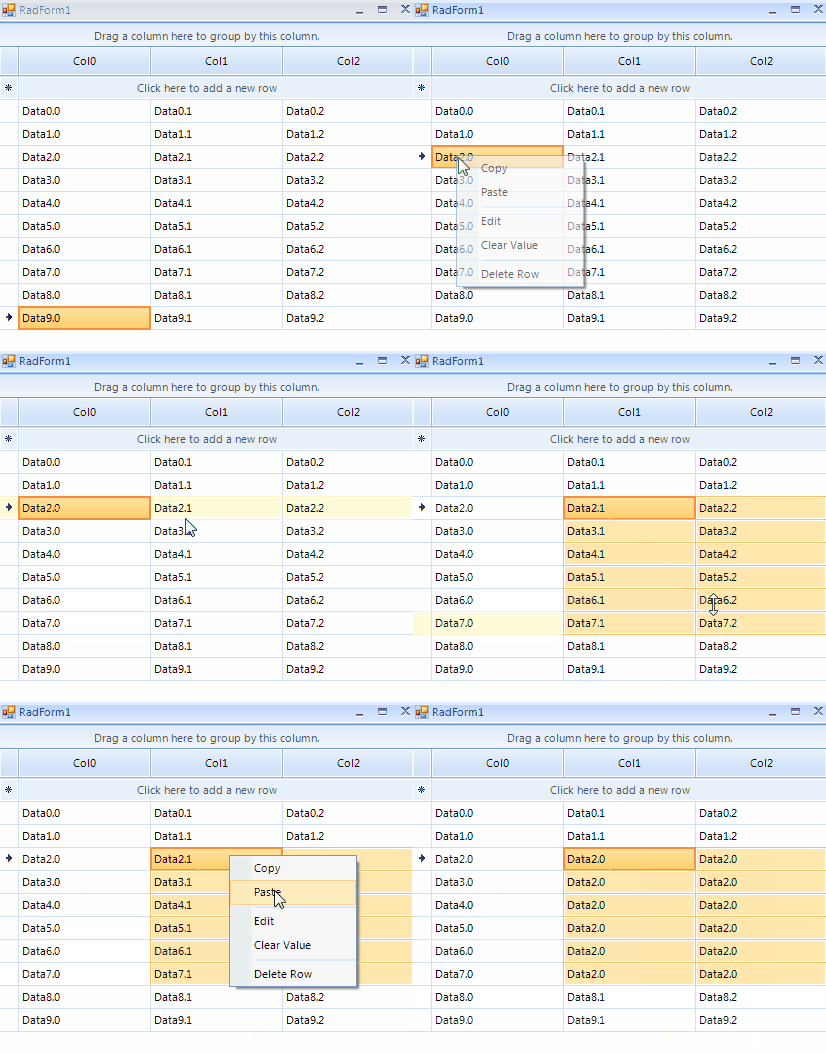
Solution
RadGridView allows pasting over a single cell. If you need to affect all selected cells with the copied value, it would be necessary to handle the Pasting event and perform the desired action. A sample approach is demonstrated in the following code snippet:
Handling the Pasting event
C#
public RadForm1()
{
    InitializeComponent();

    for (int i = 0; i < 3; i++)
    {
        this.radGridView1.Columns.Add("Col" + i);
    }
    for (int i = 0; i < 10; i++)
    {
        this.radGridView1.Rows.Add("Data" + i + ".0", "Data" + i + ".1", "Data" + i + ".2");
    }
    this.radGridView1.AutoSizeColumnsMode = Telerik.WinControls.UI.GridViewAutoSizeColumnsMode.Fill;
    this.radGridView1.MultiSelect = true;
    this.radGridView1.SelectionMode = Telerik.WinControls.UI.GridViewSelectionMode.CellSelect;

    this.radGridView1.Pasting += radGridView1_Pasting;
}

private void radGridView1_Pasting(object sender, Telerik.WinControls.UI.GridViewClipboardEventArgs e)
{
    e.Cancel = true;
    if (e.Format == "Text")
    {
        string data = Clipboard.GetData(DataFormats.Text).ToString();
        if (data != null)
        {
            foreach (GridViewCellInfo cell in this.radGridView1.SelectedCells)
            {
                cell.Value = data;
            }
        }
    }
}