How to Include Multiple Fields in the RadDropDownList's DisplayMember
Environment
| Product Version | Product | Author |
|---|---|---|
| 2022.2.622 | RadDropDownList for WinForms | Desislava Yordanova |
Description
When using data binding for populating RadDropDownList with data, note that the DisplayMember property allows you to specify the particular field in the data source which will be used by the items in RadDropDownList for their Text. However, it is possible to specify only a single field.
DataTable dt = new DataTable();
dt.Columns.Add("Id", typeof(int));
dt.Columns.Add("FirstName", typeof(string));
dt.Columns.Add("LastName", typeof(string));

dt.Rows.Add(1, "Thomas", "Hardy");
dt.Rows.Add(2, "John", "Brown");
dt.Rows.Add(3, "Anna", "Smith");

this.radDropDownList1.DisplayMember = "LastName";
this.radDropDownList1.ValueMember = "Id";
this.radDropDownList1.DataSource = dt;
Default DisplayMember
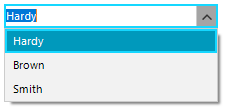
A common requirement is to include more than one property in the DisplayMember, e.g. "FirstName" + "LastName". This article shows a sample approach how to do it.
Solution
1. Subscribe to the RadDropDownList.VisualListItemFormatting event and set the VisualItem.Text to the desired combined text extracted from the DataBoundItem.
private void radDropDownList1_VisualListItemFormatting(object sender, VisualItemFormattingEventArgs args)
{
    DataRowView row = args.VisualItem.Data.DataBoundItem as DataRowView;
    args.VisualItem.Text = row["FirstName"] + " " + row["LastName"];
}
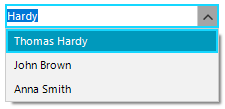
Thus, the popup items will show the complete name. But the editable part still will show only the field specified as DisplayMember:
Combined Text in the DropDown Items
2. Create a field in the data source collection that combines multiple fields (e.g. "FirstName" + "LastName"). Then, set that combined field as DisplayMember.
DataTable dt = new DataTable();
dt.Columns.Add("Id", typeof(int));
dt.Columns.Add("FirstName", typeof(string));
dt.Columns.Add("LastName", typeof(string));
dt.Columns.Add("FullName", typeof(string));

dt.Rows.Add(1, "Thomas", "Hardy");
dt.Rows.Add(2, "John", "Brown");
dt.Rows.Add(3, "Anna", "Smith");

foreach (DataRow row in dt.Rows)
{
    row["FullName"]= row["FirstName"]+" "+row["LastName"];
}

this.radDropDownList1.DisplayMember = "FullName";
this.radDropDownList1.ValueMember = "Id";
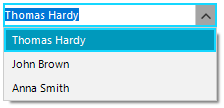
this.radDropDownList1.DataSource = dt;
Thus, the editable part will also show the full name: