New to Telerik UI for WinForms? Start a free 30-day trial
Specifying a Radius for a MapPoint
Updated on Aug 27, 2026
Environment
| Product Version | 2021.3.1123 |
| Product | RadMap for WinForms |
Description
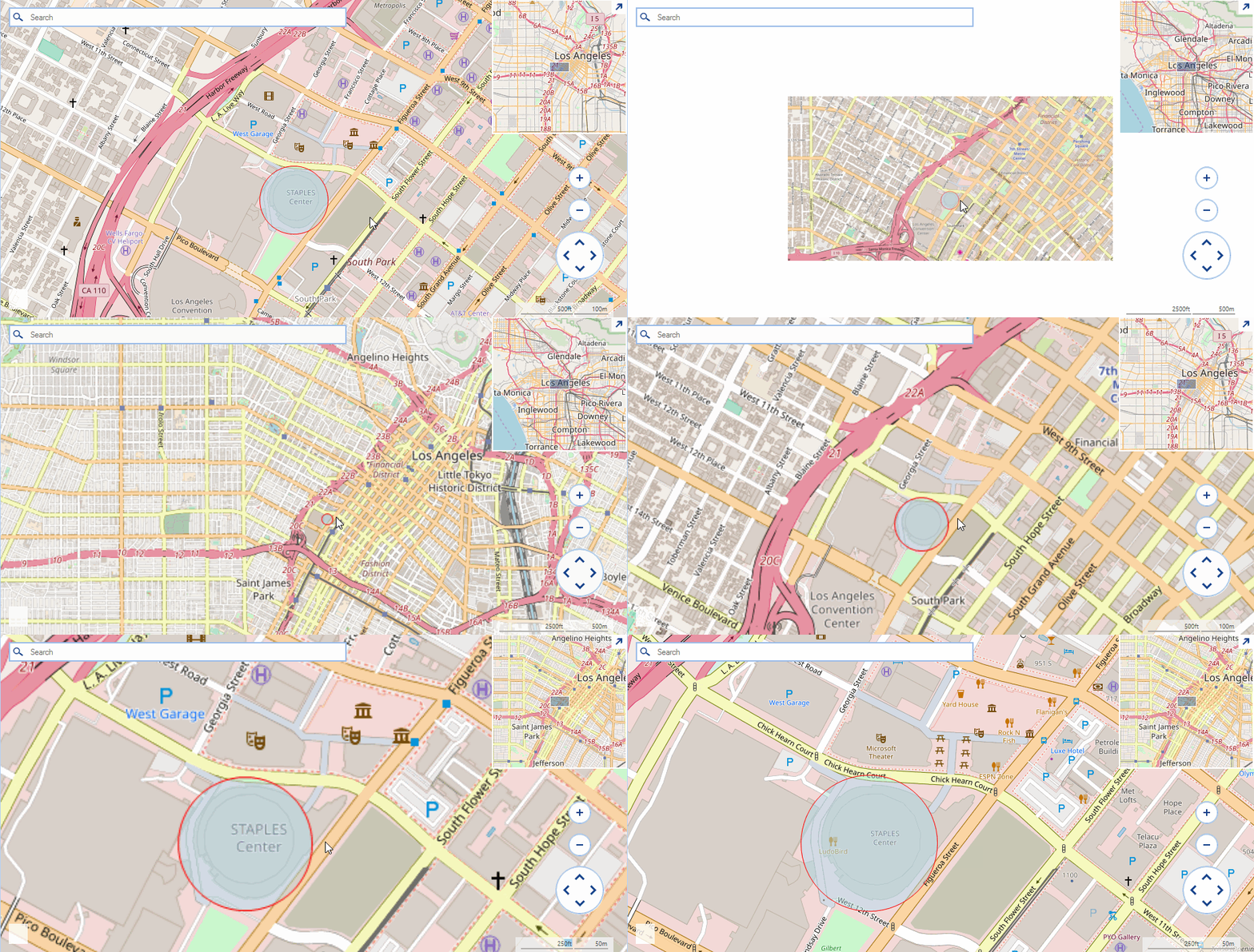
An example demonstrating how the MapPoint element can be customized to paint a circle with a predefined radius.
Solution
The MapPoint class accepts a System.Drawing.Size object in its constructor and depending on the specified size the control will paint a circular element. A common requirement is to specify a radius for the map point and have its size adjusted according the radius and the current zoom level of the view port. The solution in this article demonstrates a possible custom implementation introducing a new RadiusInMeters property.
Figure 1: Custom Map Point
Updating Header Implementation
C#
public class CustomMapPoint : MapPoint
{
    private int radiusInMeters;
    private int maxZoom;

    public CustomMapPoint(PointG location) : base(location)
    {
    }

    public CustomMapPoint(PointG location, Size size) : base(location, size)
    {
    }

    public int MaxZoom
    {
        get
        {
            return this.maxZoom;
        }
        set
        {
            this.maxZoom = value;
        }
    }

    public int RadiusInMeters
    {
        get
        {
            return this.radiusInMeters;
        }
        set
        {
            this.radiusInMeters = value;
        }
    }

    public override void ViewportChanged(IMapViewport viewport, ViewportChangeAction action)
    {
        double onePixelInMeters = MapTileSystemHelper.GroundResolution(this.Location.Latitude, this.MaxZoom - viewport.ZoomLevel);
        Console.WriteLine(onePixelInMeters + " " + viewport.ZoomLevel);
        int scale = -1;
        scale = (int)(onePixelInMeters / this.RadiusInMeters * 2);

        Size newSize = Size.Empty;
        if (scale > 1)
            newSize = new Size(scale, scale);
        this.Size = newSize;
        base.ViewportChanged(viewport, action);
    }
}
Initial Setup
C#
public RadForm1()
{
    InitializeComponent();

    string cacheFolder = @"..\..\cache";
    OpenStreetMapProvider osmProvider = new OpenStreetMapProvider();
    osmProvider.MaxZoomLevel = 10;
    MapTileDownloader tileDownloader = osmProvider.TileDownloader as MapTileDownloader;
    tileDownloader.WebHeaders.Add(System.Net.HttpRequestHeader.UserAgent, "your application name");
    LocalFileCacheProvider cache = new LocalFileCacheProvider(cacheFolder);
    osmProvider.CacheProvider = cache;
    this.radMap1.MapElement.Providers.Add(osmProvider);

    MapLayer pointLayer = new MapLayer("PointG");
    this.radMap1.Layers.Add(pointLayer);

    CustomMapPoint element = new CustomMapPoint(new PointG(34.04302, -118.26725));
    element.RadiusInMeters = 100;
    element.MaxZoom = osmProvider.MaxZoomLevel;
    element.BackColor = Color.FromArgb(125, Color.LightBlue);
    element.BorderColor = Color.Red;
    this.radMap1.Layers["PointG"].Add(element);
}