New to Telerik UI for WinForms? Start a free 30-day trial
Exporting RadMap to an Image
Updated on Aug 27, 2026
Environment
| Product Version | 2018.1 220 |
| Product | RadMap for WinForms |
Description
An article demonstrating how the currently visible part of map control can be exported to an image. The suggested approach will also handle a case painting the layers, making it possible for any pins to be exported as well.
Solution
RadMap will be exported with the help of the Graphics and RadGdiGraphics classes.
Figure 1: Exporting RadMap
| Control | Exported Image |
|---|---|
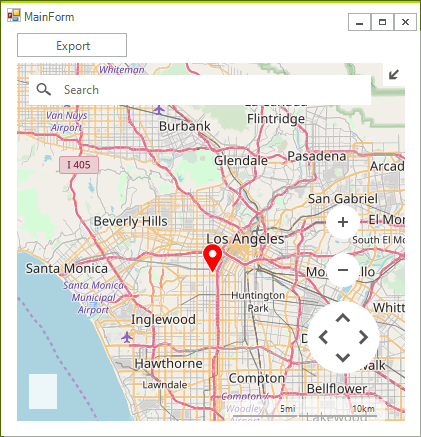 | 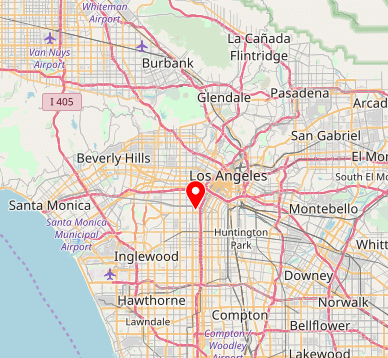 |
The control will be set up with the OpenStreetMapProvider including a layer with pins.
Initial Setup
C#
public RadMapExportImageForm()
{
    InitializeComponent();
    MapLayer pinLayer = new MapLayer("PinsLayer");
    this.radMap1.Layers.Add(pinLayer);
    OpenStreetMapProvider osmProvider = new OpenStreetMapProvider();
    osmProvider.InitializationComplete += OsmProvider_InitializationComplete;
    this.radMap1.MapElement.Providers.Add(osmProvider);
}
private void OsmProvider_InitializationComplete(object sender, EventArgs e)
{
    MapPin element = new MapPin(new PointG(34.0140562, -118.2880489));
    element.Text = "Los Angeles";
    element.BackColor = Color.Red;
    this.radMap1.Layers["PinsLayer"].Add(element);
    this.radMap1.BringIntoView(element.Location, 10);
}
Actual Export Implementation
C#
private void radButton1_Click(object sender, EventArgs e)
{
    Bitmap bitmap = new Bitmap((int)this.radMap1.MapElement.ViewportInPixels.Size.Width, (int)this.radMap1.MapElement.ViewportInPixels.Height);
    Graphics g = Graphics.FromImage(bitmap);
    RadGdiGraphics gg = new RadGdiGraphics(g);
    foreach (MapVisualElement element in this.radMap1.MapElement.Providers[0].GetContent(this.radMap1.MapElement))
    {
        element.Paint(gg, this.radMap1.MapElement);
    }
    object state = gg.SaveState();

	//As of R2 2021 calling TranslateTransform is not necessary
    //gg.TranslateTransform(-this.radMap1.MapElement.ViewportInPixels.X, -this.radMap1.MapElement.ViewportInPixels.Y);

    this.radMap1.MapElement.Layers["PinsLayer"].Paint(gg, this.radMap1.MapElement);
    gg.RestoreState(state);
    bitmap.Save(@"..\..\test.png", ImageFormat.Png);
}
    }
As of R2 2021 calling the TranslateTransform method for the RadGdiGraphics object is not necessary. For older versions, please make sure that the method is executed.
A complete solution providing a C# and VB.NET project is available here.