Adding an Image to a Map Pin
Environment
| Product Version | 2021.3.1123 |
| Product | RadMap for WinForms |
Description
RadMap supports pins and they can be added to it so that additional information be displayed in a friendly manner. The default implementation relies on the System.Drawing.Graphics and System.Drawing.GraphicsPath classes and at the end the pins are painted as shapes according to calculated paths. Currently, the MapPin object does not support images and this article will suggest a possible implementation.
Solution
Please note that Bing Maps will be deprecated effective June 30, 2025. As an alternative, users can refer to the SDK example available in our GitHub repository, which demonstrates how to create a custom provider using the Azure Maps API. A valid Azure Maps subscription key is required to use this functionality.
The image below demonstrates the end result utilizing the custom pin.
Figure 1: Pin with an Image
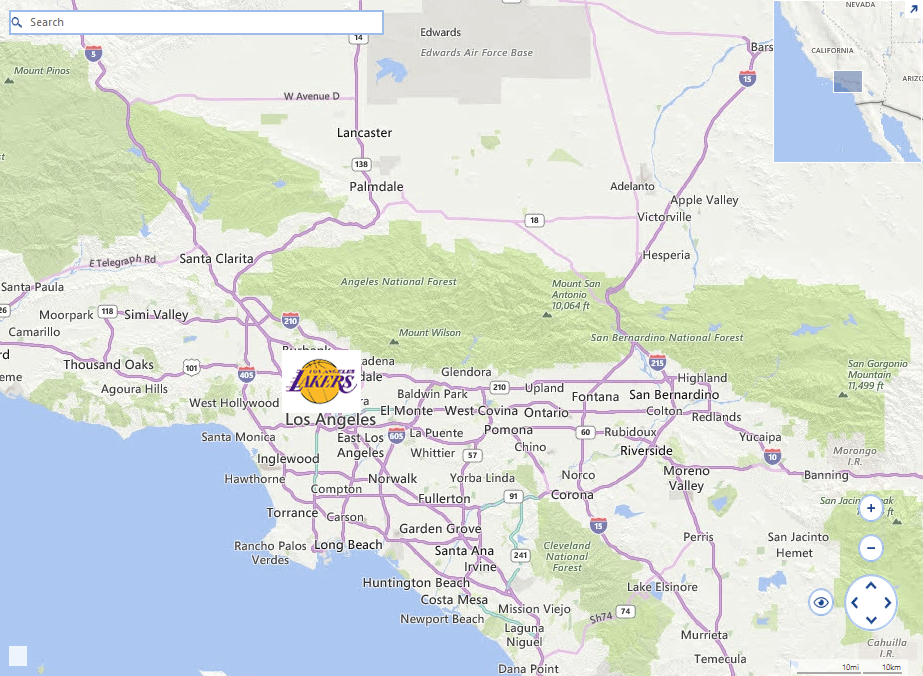
The MapPin object will be extended with a new Image property. The actual rendering of the image will happen in the virtual Paint method, preserving the default implementation if no image is specified for a particular pin.
1. Inherit the MapPin class and add a new Image property to it.
- Override the Paint method and use the Graphics.DrawImage method.
- Override the ViewPortChanged and HitTest methods so that the pin`s location is validated. This way we will ensure that the pin is inside the visible portion of the map when the image will be painted.
Custom Pin Implementation
    public class CustomMapPin : MapPin
    {
        private Image image;
        private PointL pixelLocation;
        private RectangleL drawRect;
        private bool isImageInViewPort;

        public CustomMapPin(PointG location)
            : base(location)
        {
        }

        public Image Image
        {
            get
            {
                return image;
            }
            set
            {
                this.image = value;
            }
        }

        public override bool IsInViewport
        {
            get { return this.Image != null ? this.isImageInViewPort : base.IsInViewport; }
        }

        public override void Paint(IGraphics graphics, IMapViewport viewport)
        {
            object state = graphics.SaveState();
            graphics.ChangeSmoothingMode(SmoothingMode.AntiAlias);

            MapVisualElementInfo info = this.GetVisualElementInfo(viewport);
            GraphicsPath path = info.Path.Clone() as GraphicsPath;
            GraphicsPath dotPath = new GraphicsPath();
            long mapSize = MapTileSystemHelper.MapSize(viewport.ZoomLevel);
            Matrix matrixOffset = new Matrix();
            matrixOffset.Translate(viewport.PanOffset.Width + info.Offset.X, viewport.PanOffset.Height + info.Offset.Y);
            path.Transform(matrixOffset);

            Matrix matrixWraparound = new Matrix();
            matrixWraparound.Translate(mapSize, 0);

            for (int i = 0; i < viewport.NumberOfWraparounds; i++)
            {
                RectangleF bounds = path.GetBounds();
                float diameter = bounds.Width / 3F;
                dotPath.AddEllipse(bounds.X + diameter, bounds.Y + diameter, diameter, diameter);
                graphics.FillPath(this.BorderColor, dotPath);

                //draw the image
                Point imageLocation = new Point((int)bounds.Location.X + (int)bounds.Width / 2 - this.image.Width / 2, (int)bounds.Location.Y);
                graphics.DrawImage(imageLocation, this.Image, true);

                path.Transform(matrixWraparound);
            }

            graphics.RestoreState(state);
        }

        public override void ViewportChanged(IMapViewport viewport, ViewportChangeAction action)
        {
            if (this.Image == null)
            {
                base.ViewportChanged(viewport, action);
                return;
            }

            long mapSize = MapTileSystemHelper.MapSize(viewport.ZoomLevel);

            if ((action & ViewportChangeAction.Zoom) != 0)
            {
                this.pixelLocation = MapTileSystemHelper.LatLongToPixelXY(this.Location, viewport.ZoomLevel);
            }

            if ((action & ViewportChangeAction.Pan) != 0)
            {
                this.drawRect = new RectangleL(pixelLocation.X - this.Image.Size.Width / 2, pixelLocation.Y - this.Image.Size.Height, this.Image.Size.Width, this.Image.Size.Height);
            }

            RectangleL wraparoundDrawRect = this.drawRect;

            for (int i = 0; i <= viewport.NumberOfWraparounds; i++)
            {
                if (wraparoundDrawRect.IntersectsWith(viewport.ViewportInPixels))
                {
                    this.isImageInViewPort = true;

                    break;
                }

                wraparoundDrawRect.Offset(mapSize, 0L);
            }

            if (!this.IsInViewport)
            {
                return;
            }
        }

        public override bool HitTest(PointG pointG, PointL pointL, IMapViewport viewport)
        {
            if (this.Image == null)
            {
                return base.HitTest(pointG, pointL, viewport);
            }

            return this.drawRect.Contains(pointL);
        }
    }
2. Instatiate the custom pin object and add it to the map.
Use the Custom Pin
public RadMapCustomPin()
{
    InitializeComponent();
    this.SetupProviders();
    MapLayer pointLayer = new MapLayer("PointG");
    this.radMap1.Layers.Add(pointLayer);
    MapPin element = new CustomMapPin(new PointG(34.04302, -118.26725))
    {
        Image = Properties.Resources.NBALakers
    };
    element.Text = "Los Angeles";
    element.BackColor = Color.Red;
    this.radMap1.Layers["PointG"].Add(element);
}
private void SetupProviders()
{
    BingRestMapProvider bingProvider = new BingRestMapProvider();
    bingProvider.Culture = System.Threading.Thread.CurrentThread.CurrentCulture;
    bingProvider.ImagerySet = ImagerySet.Road;
    bingProvider.UseSession = true;
    bingProvider.BingKey = this.bingKey;
    this.radMap1.MapElement.Providers.Add(bingProvider);
}
A complete solution providing a C# and VB.NET project is available here.