New to Telerik UI for WinForms? Start a free 30-day trial
How to Hide the Add to dictionary Context Menu Item
Updated on Aug 27, 2026
Environment
| Product Version | Product | Author |
|---|---|---|
| 2019.3.917 | RadSpellChecker for WinForms | Desislava Yordanova |
Description
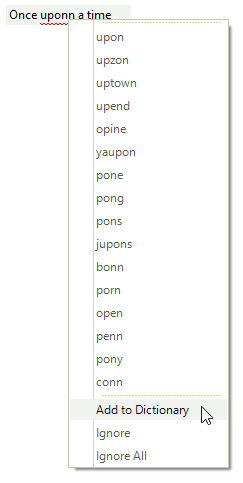
RadSpellChecker offers spell-check as you type functionality that is supported for RadTextBox and RadTextBoxControl. This article demonstrates how to hide the 'Add to Dictionary' option in the context menu which is shown once you right-click an incorrect word.
Solution
You can find below two sample code snippets demonstrating how to access the context menu with suggested words and hide the 'Add to Dictionary' option.
Hide the 'Add to Dictionary' menu item for RadTextBoxControl
C#
public RadForm1()
{
    InitializeComponent();
    this.radSpellChecker1.AutoSpellCheckControl = this.radTextBoxControl1;
    this.radTextBoxControl1.Text = "Once uponn a time";

    this.radTextBoxControl1.ContextMenuOpening += radTextBoxControl1_ContextMenuOpening;
}

private void radTextBoxControl1_ContextMenuOpening(object sender, TreeBoxContextMenuOpeningEventArgs e)
{
    foreach (RadItem item in e.ContextMenu.Items)
    {
        if (item.Text.Contains("Add to Dictionary"))
            item.Visibility = Telerik.WinControls.ElementVisibility.Collapsed;
    }
}
Hide the 'Add to Dictionary' menu item for RadTextBox
C#
public RadForm1()
{
    InitializeComponent();
    this.radSpellChecker1.AutoSpellCheckControl = this.radTextBox1;
    this.radTextBox1.Text = "Once uponn a time";

    TextBoxSpellChecker textSpellChecker = this.radSpellChecker1.GetControlSpellChecker(typeof(RadTextBox)) as TextBoxSpellChecker;
    if (textSpellChecker != null)
    {
        textSpellChecker.DropDownMenu.PopupOpening += DropDownMenu_PopupOpening;
    }
}

private void DropDownMenu_PopupOpening(object sender, CancelEventArgs args)
{
    RadDropDownMenu menu = sender as RadDropDownMenu;
    foreach (RadItem item in menu.Items)
    {
        if (item.Text.Contains("Add to Dictionary"))
        {
            item.Visibility = Telerik.WinControls.ElementVisibility.Collapsed;
        }
    }
}