New to Telerik UI for WinForms? Start a free 30-day trial
Print Header in RadGridView Only on the First Page
Updated over 1 year ago
Environment
| Product Version | Product | Author |
|---|---|---|
| 2020.3.1020 | RadGridView for WinForms | Desislava Yordanova |
Description
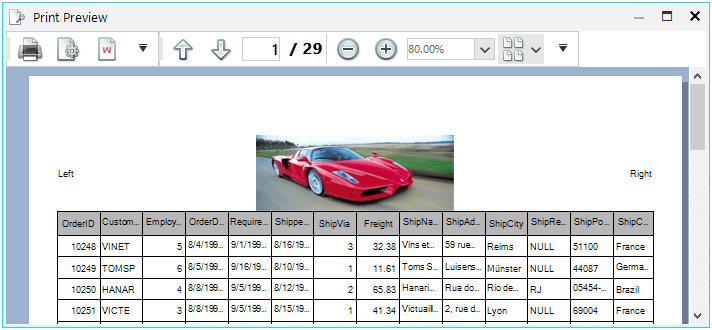
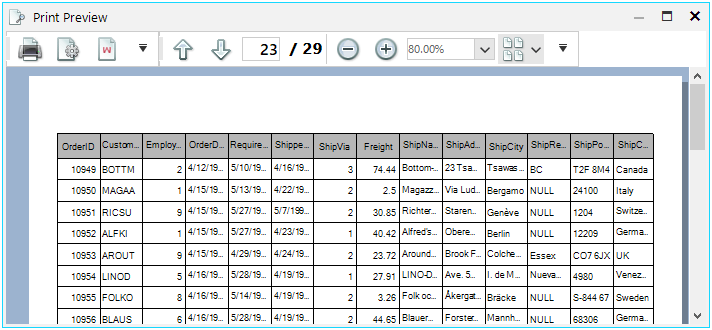
This tutorial demonstrates how to have header only on the first printed page and skip it for the rest of the pages.
Solution
For this purpose, it is necessary to create a custom RadPrintDocument and in its PrintHeader method you can draw the header only for the necessary pages.
C#
public class MyPrintDocument : RadPrintDocument
{
    protected override void PrintHeader(System.Drawing.Printing.PrintPageEventArgs args)
    {
        if (this.PrintedPage == 1)
        {
            Rectangle headerRect = new Rectangle(args.MarginBounds.Location, new Size(args.MarginBounds.Width, HeaderHeight));

    StringFormat stringFormat = new StringFormat();
    stringFormat.LineAlignment = StringAlignment.Center;

    string leftString = (this.ReverseHeaderOnEvenPages && this.PrintedPage % 2 == 0) ? this.RightHeader : this.LeftHeader;
    string rightString = (this.ReverseHeaderOnEvenPages && this.PrintedPage % 2 == 0) ? this.LeftHeader : this.RightHeader;

    if (this.HasLogoInHeaderFooterString(leftString) && this.Logo != null)
    {
        this.PrintLogo(args.Graphics, new Rectangle(headerRect.X, headerRect.Y, headerRect.Width / 3, headerRect.Height));
    }

    stringFormat.Alignment = StringAlignment.Near;
    args.Graphics.DrawString(ParseHeaderFooterString(leftString), this.HeaderFont, Brushes.Black, headerRect, stringFormat);

    if (this.HasLogoInHeaderFooterString(this.MiddleHeader) && this.Logo != null)
    {
        this.PrintLogo(args.Graphics, new Rectangle(headerRect.X + (headerRect.Width / 3), headerRect.Y, headerRect.Width / 3, headerRect.Height));
    }

    stringFormat.Alignment = StringAlignment.Center;
    args.Graphics.DrawString(ParseHeaderFooterString(this.MiddleHeader), this.HeaderFont, Brushes.Black, headerRect, stringFormat);

    if (this.HasLogoInHeaderFooterString(rightString) && this.Logo != null)
    {
        this.PrintLogo(args.Graphics, new Rectangle(headerRect.Right - (headerRect.Width / 3), headerRect.Y, headerRect.Width / 3, headerRect.Height));
    }

    stringFormat.Alignment = StringAlignment.Far;
    args.Graphics.DrawString(ParseHeaderFooterString(rightString), this.HeaderFont, Brushes.Black, headerRect, stringFormat);
            this.HeaderHeight = -1;
        }
    }
}

private void radButton1_Click(object sender, EventArgs e)
{
    //setup print style for the drid
    GridPrintStyle style = new GridPrintStyle();
    style.PrintHiddenColumns = false;
    style.FitWidthMode = PrintFitWidthMode.FitPageWidth;
    style.PrintHeaderOnEachPage = true;
    style.AlternatingRowColor = Color.LightGray;
    this.radGridView1.PrintStyle = style;

    {
        MyPrintDocument doc = new MyPrintDocument();
        doc.Margins.Left = 35;
        doc.Margins.Right = 35;
        doc.Margins.Top = 75;
        doc.Margins.Bottom = 50;
        doc.HeaderHeight = 100;
        doc.Landscape = false;
        doc.AssociatedObject = this.radGridView1;
        doc.LeftHeader = "Left";
        doc.MiddleHeader = "[Logo]";
        doc.RightHeader = "Right";
        doc.Logo = Properties.Resources.Ferrari_Enzo;
        doc.FooterFont = new Font("Tahoma", 6);
        doc.RightFooter = "Page [Page #] of [Total Pages]. Printed on [Date Printed] [Time Printed].";
        RadPrintPreviewDialog dialog = new RadPrintPreviewDialog(doc);
        dialog.Owner = this;
        dialog.ShowDialog();
    }
}