New to Telerik UI for WinForms? Start a free 30-day trial
How to Export Each Grid Group on a Single Page
Updated over 1 year ago
Environment
| Product Version | Product | Author |
|---|---|---|
| 2020.1.113 | RadGridView for WinForms | Desislava Yordanova |
Description
By default, GridViewPdfExport is not intended to export the groups in RadGridView on separate pages. Hence, it doesn't provide a public API for achieving this behavior.
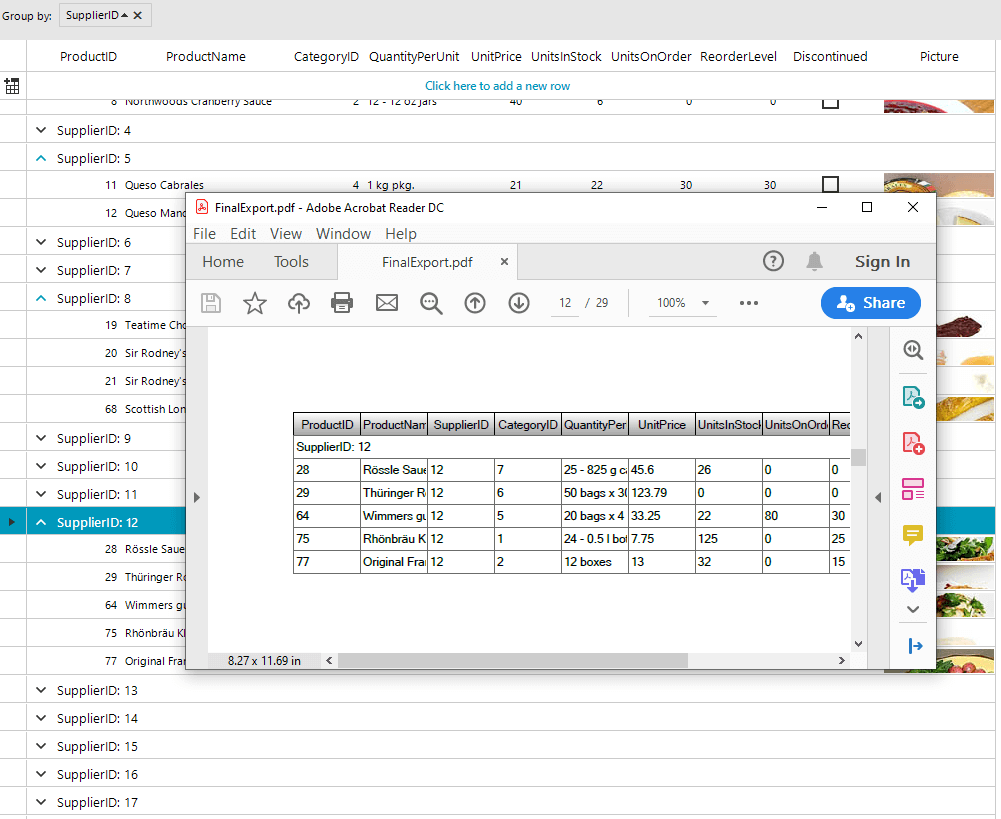
This article aims to demonstrates a sample approach how each group can be exported on a single PDF page.
Solution
Iterate all groups in the original RadGridView and create a dummy grid for each group which is populated with the rows for the respective group. Then, add a GroupDescriptor to the dummy grid and export it to PDF. Thus, you will have N number of PDF files each containing the respective group with the group rows.
Eventually, if you want to combine all pages into one PDF document, using a PdfStreamWriter is a suitable approach:
C#
private void radButton1_Click(object sender, EventArgs e)
{
    foreach (DataGroup group in this.radGridView1.Groups)
    {
        RadGridView dummyGrid = new RadGridView();
        foreach (GridViewDataColumn col in this.radGridView1.Columns)
            dummyGrid.Columns.Add(col.Name);
        foreach (GridViewDataRowInfo rowInGroup in group.GroupRow.ChildRows)
        {
            var newRow = dummyGrid.Rows.NewRow();
            foreach (GridViewDataColumn col in this.radGridView1.Columns)
                newRow.Cells[col.Name].Value = rowInGroup.Cells[col.Name].Value;
            dummyGrid.Rows.Add(newRow);
        }

        dummyGrid.GroupDescriptors.Add(new GroupDescriptor(group.GroupDescriptor.Expression));
        Telerik.WinControls.Export.GridViewPdfExport pdfExporter = new Telerik.WinControls.Export.GridViewPdfExport(dummyGrid);
        pdfExporter.FileExtension = "pdf";
        pdfExporter.ExportVisualSettings = true;
        string fileName = @"..\..\ExportedData" + this.radGridView1.Groups.IndexOf(group) + ".pdf";
        pdfExporter.RunExport(fileName, new Telerik.WinControls.Export.PdfExportRenderer());
    }

    using (Telerik.Windows.Documents.Fixed.FormatProviders.Pdf.Streaming.PdfStreamWriter fileWriter =
        new PdfStreamWriter(System.IO.File.OpenWrite(@"..\..\FinalExport.pdf")))
    {
        foreach (DataGroup group in this.radGridView1.Groups)
        {
            string fileName = @"..\..\ExportedData" + this.radGridView1.Groups.IndexOf(group) + ".pdf";
            using (PdfFileSource fileSource = new PdfFileSource(File.OpenRead(fileName)))
            {
                foreach (PdfPageSource pageSource in fileSource.Pages)
                    fileWriter.WritePage(pageSource);
            }
        }
    }
}