New to Telerik UI for WinForms? Start a free 30-day trial
Show Embedded Label for RadDropDownList
Updated over 1 year ago
Environment
| Product Version | Product | Author |
|---|---|---|
| 2022.1.222 | RadDropDownList for WinForms | Desislava Yordanova |
Description
Since R2 2021 RadTextBox and RadTextBoxControl support embedded labels. The embedded label shows a text in the text box field usually to indicate what text should the user enter in the text box. When RadTextBox or RadTextBoxControl gets focused the embedded label will go up, so the user can type in the text box field.

A common requirement is to achieve similar functionality for RadDropDownList. This article demonstrates how to do it.
Solution
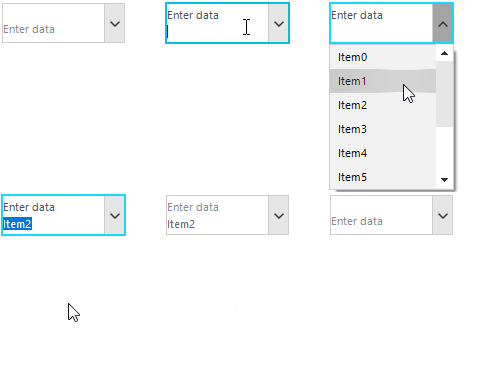
RadDropDownList internally uses a TextBox as well. The following sample code snippet demonstrates how to enable the embedded label for it. The below gif file illustrates the achieved result:
C#
this.radDropDownList1.DropDownStyle = RadDropDownStyle.DropDown;
this.radDropDownList1.DropDownListElement.TextBox.ShowEmbeddedLabel = true;
this.radDropDownList1.DropDownListElement.TextBox.EmbeddedLabel.Text = "Enter data";

for (int i = 0; i < 10; i++)
{
    this.radDropDownList1.Items.Add("Item" + i);
}
this.radDropDownList1.SelectedItem = null;