Docking controls on a form in a Windows Forms application
| Article relates to | Product | Author | Last modified |
|---|---|---|---|
| RadControls for WinForms | Telerik UI for WinForms | Nikolay Diyanov | Aug 03, 2009 |
Introduction
When you are developing a Windows Forms application and the design of your form requires several docked controls, it is important to place the controls on your form in the correct order. Otherwise, you may not get the desired result. Since a sample case is worth thousand words, please refer to the sample below which explains what can get wrong in the process of designing your form and how you can fix it.
Solution
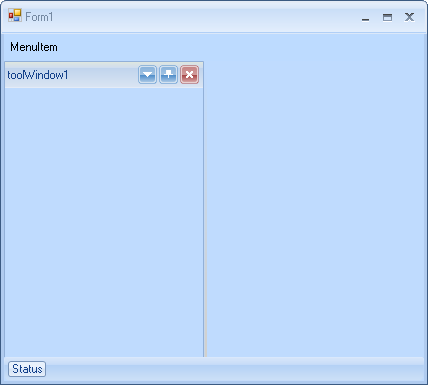
So, let’s have three controls on our form – RadDock, RadMenu and RadStatusStrip. We want to dock the RadMenu instance to Top, RadStatusStrip to Bottom and RadDock to Fill. We are setting the Dock property of the controls to the desired values – Top, Bottom, Fillfor RadMenu, RadStatusStrip and RadDock respectively. However, as you can see in the screenshow below, we do not get the desired layout – RadStatusStrip overlaps RadDock.
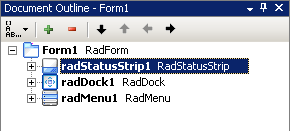
Why does this happen? In Windows Forms (this is valid not only for RadControls, but for all WinForms controls) it is important to set the controls on the form in the right order – the order of which they are added to the form. You can review this order in the Visual Studio Document Outline tool (View >> Other Windows >> Document Outline or Ctrl + Alt + T shortcut). If we inspect the hierarchy of controls on the form, we will see this picture:
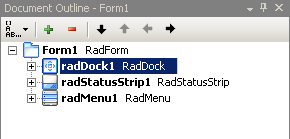
However, in order to have RadDock between RadMenu and RadStatusStrip, RadDock should have its Dock property set to Fill and RadDock should be on top of the controls that will surround it:
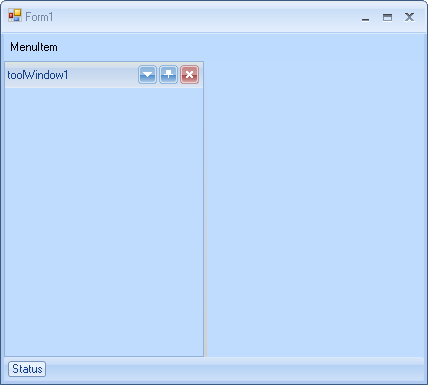
In this case, we will get the desired layout. The result is shown on the screenshot below: