New to Telerik UI for WinForms? Start a free 30-day trial
Change the Color of Focus Cue Border for RadCheckBox
Updated over 1 year ago
Environment
| Product Version | Product | Author |
|---|---|---|
| 2021.3.1123 | RadCheckBox for WinForms | Desislava Yordanova |
Description
When the AllowShowFocusCues property is enabled for a certain control, pressing the Tab key will indicate that the control is focused by showing a thin dotted rectangular frame. The style of the frame cannot be customized.
Default Focus Cue
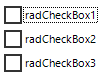
However, this article demonstrates a sample approach how to change the color for the dotted focus border:
Customized Color for the Focus Cue
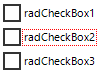
Solution
Create a derivative of RadCheckBox and its RadCheckBoxElement and override its PaintFocusCues method where the ControlPaint.DrawFocusRectangle method is used. However, we will use the Graphics object and calculated rectangle to draw the focus cue with the desired color:
C#
public class CustomCheckBox : RadCheckBox
{
    public override string ThemeClassName
    {
        get
        {
            return typeof(RadCheckBox).FullName;
        }
    }

    protected override RadButtonElement CreateButtonElement()
    {
        return new CustomRadCheckBoxElement();
    }
}

public class CustomRadCheckBoxElement : RadCheckBoxElement
{
    protected override Type ThemeEffectiveType
    {
        get
        {
            return typeof(RadCheckBoxElement);
        }
    }

    protected override void PaintFocusCues(Telerik.WinControls.Paint.IGraphics graphics, Rectangle clipRectange)
    {
        Rectangle focusRect = GetFocusRect();
        if (focusRect.Width <= 0 || focusRect.Height <= 0)
        {
            return;
        }

        Graphics real = (Graphics)graphics.UnderlayGraphics;
        //ControlPaint.DrawFocusRectangle(real, focusRect);
        var pen = new Pen(Color.Red, 1);
        pen.DashStyle = DashStyle.Dot;
        real.DrawRectangle(pen, focusRect.X, focusRect.Y, focusRect.Width-1, focusRect.Height);
    }
}