Collapsible menu from Demo application
Environment
| Date Posted | Product | Author |
|---|---|---|
| March 27, 2015 | RadCollapsiblePanel for WinForms | Desislava Yordanova |
Problem
This article demonstrates how to achieve the collapsible menu from the Demo application.
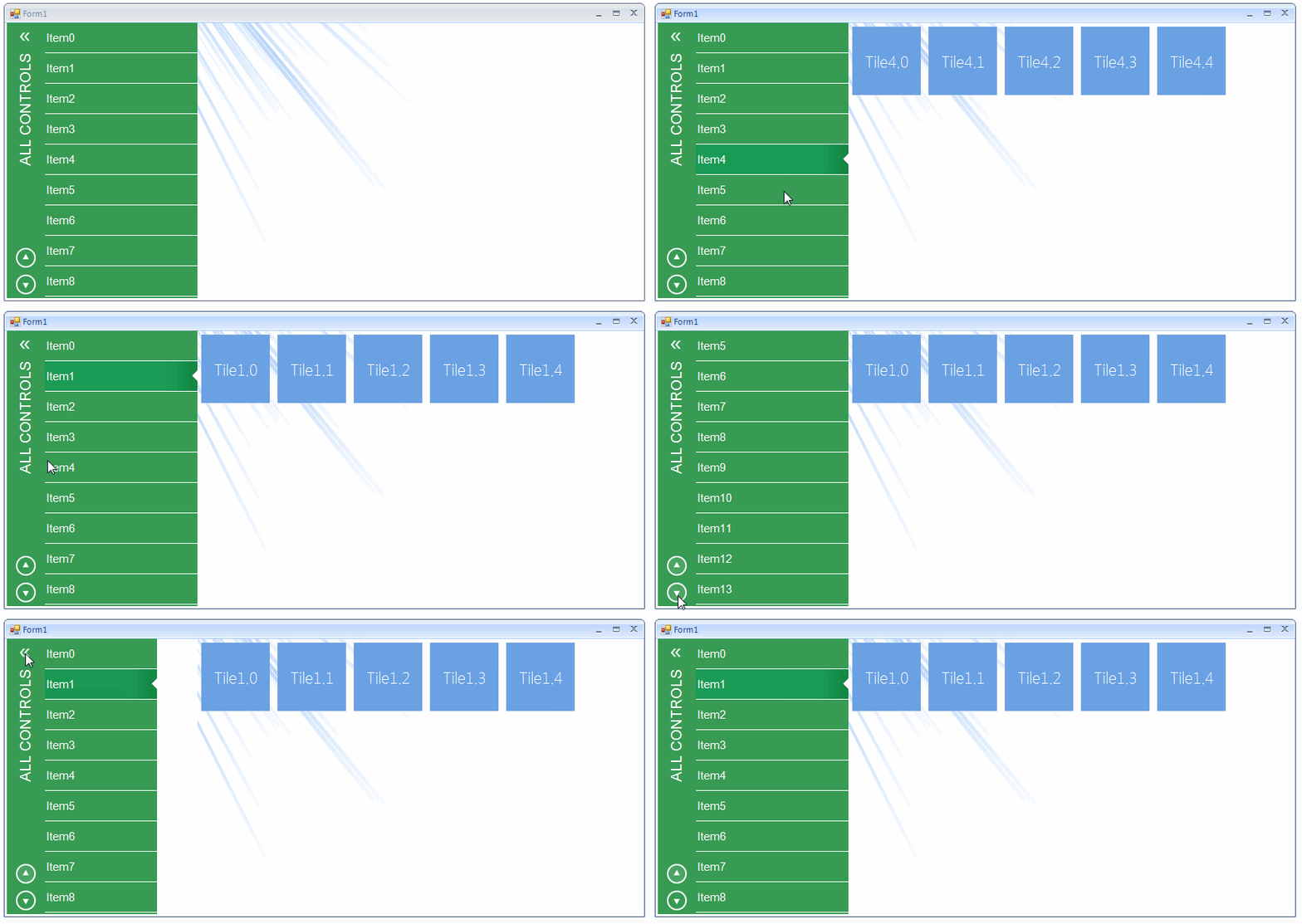
Solution
Firstly, you should create a new project with a RadForm. Afterwards, drag a RadCollapsiblePanel and a RadPanorama from the Toolbox and drop them onto the form. You need to insert a RadListControl in the RadCollapsiblePanel.
Then, you should change the RadCollapsiblePanel.ExpandDirection to Right and customize its style by changing the header font, fore color, rotate the text etc*.*We should apply a specific image to the HeaderButtonElement for the expanded and collapsed state. We will use LightVisualElement s for the up and down arrows added to the CollapsiblePanelElement.HeaderElement.Children collection. In order to customize the RadListControl, we can use the VisualItemFormatting event.
Font font = new Font("Arial", 14f);
Font itemsFont = new Font("Arial", 11f);

public Form1()
{
    InitializeComponent();

    this.BackColor = Color.White;

    this.radCollapsiblePanel1.Width = 250;
    this.radCollapsiblePanel1.Dock = DockStyle.Left;
    this.radCollapsiblePanel1.ExpandDirection = Telerik.WinControls.UI.RadDirection.Right;

    this.radPanorama1.Dock = DockStyle.Fill;
    this.radPanorama1.PanoramaElement.BackColor = Color.Transparent;

    this.radCollapsiblePanel1.HeaderText = "ALL CONTROLS";
    this.radCollapsiblePanel1.CollapsiblePanelElement.HeaderElement.Margin = new Padding(0, 0, -5, 0);
    this.radCollapsiblePanel1.CollapsiblePanelElement.HeaderElement.HeaderTextElement.AngleTransform = 180;
    this.radCollapsiblePanel1.CollapsiblePanelElement.HeaderElement.HeaderTextElement.Font = font;
    this.radCollapsiblePanel1.CollapsiblePanelElement.HeaderElement.HeaderTextElement.ForeColor = Color.White;
    this.radCollapsiblePanel1.CollapsiblePanelElement.HeaderElement.HeaderTextElement.StretchHorizontally = true;
    this.radCollapsiblePanel1.CollapsiblePanelElement.HeaderElement.HeaderTextElement.StretchVertically = true;
    this.radCollapsiblePanel1.CollapsiblePanelElement.ShowHeaderLine = false;
    this.radCollapsiblePanel1.ControlsContainer.PanelElement.Border.Visibility = Telerik.WinControls.ElementVisibility.Collapsed;

    this.radCollapsiblePanel1.Collapsed += radCollapsiblePanel1_Collapsed;
    this.radCollapsiblePanel1.Expanded += radCollapsiblePanel1_Expanded;

    this.radCollapsiblePanel1.CollapsiblePanelElement.HeaderElement.HeaderButtonElement.MinSize = new Size(40, 40);
    this.radCollapsiblePanel1.CollapsiblePanelElement.HeaderElement.HeaderButtonElement.Image = Properties.Resources.chevron_left;
    this.radCollapsiblePanel1.CollapsiblePanelElement.HeaderElement.HeaderButtonElement.ImageLayout = ImageLayout.Zoom;
    this.radCollapsiblePanel1.CollapsiblePanelElement.HeaderElement.HeaderButtonElement.Shape = null;
    this.radCollapsiblePanel1.CollapsiblePanelElement.HeaderElement.HeaderButtonElement.DrawFill = false;
    this.radCollapsiblePanel1.CollapsiblePanelElement.HeaderElement.HeaderButtonElement.DrawBorder = false;

    Color greenColor = Color.FromArgb(55, 155, 83);
    this.radCollapsiblePanel1.CollapsiblePanelElement.HeaderElement.BackColor = greenColor;
    this.radCollapsiblePanel1.PanelContainer.BackColor = greenColor;
    this.radCollapsiblePanel1.PanelContainer.Margin = new Padding(20, 0, 0, 0);
    this.radCollapsiblePanel1.CollapsiblePanelElement.HeaderElement.GradientStyle = Telerik.WinControls.GradientStyles.Solid;

    LightVisualElement upButton = new LightVisualElement();
    upButton.StretchVertically = false;
    upButton.MaxSize = upButton.MinSize = new System.Drawing.Size(50, 35);
    upButton.Click += upButton_Click;
    upButton.Image = Properties.Resources.arrow_up;
    upButton.MouseEnter += upButton_MouseEnter;
    upButton.MouseLeave += upButton_MouseLeave;
    this.radCollapsiblePanel1.CollapsiblePanelElement.HeaderElement.Children.Add(upButton);

    LightVisualElement downButton = new LightVisualElement();
    downButton.StretchVertically = false;
    downButton.MaxSize = downButton.MinSize = new System.Drawing.Size(50, 35);
    downButton.Click += downButton_Click;
    downButton.Image = Properties.Resources.arrow_down;
    downButton.MouseEnter += downButton_MouseEnter;
    downButton.MouseLeave += downButton_MouseLeave;
    this.radCollapsiblePanel1.CollapsiblePanelElement.HeaderElement.Children.Add(downButton);

    radListControl1.ListElement.BackColor = Color.Transparent;

    radListControl1.ItemHeight = 40;
    radListControl1.VisualItemFormatting += listControl_VisualItemFormatting;
    radListControl1.Dock = DockStyle.Fill;
    radListControl1.ListElement.DrawBorder = false;
    for (int i = 0; i < 50; i++)
    {
        radListControl1.Items.Add("Item" + i);
    }
    radListControl1.ListElement.Scroller.ScrollState = ScrollState.AlwaysHide;
    radListControl1.SelectedIndexChanged += radListControl1_SelectedIndexChanged;
    this.radCollapsiblePanel1.PanelContainer.Controls.Add(radListControl1);
}

private void radListControl1_SelectedIndexChanged(object sender, Telerik.WinControls.UI.Data.PositionChangedEventArgs e)
{
    this.radPanorama1.Items.Clear();
    for (int i = 0; i < 5; i++)
    {
        RadTileElement tile = new RadTileElement();
        tile.Text = "Tile" + e.Position + "." + i;
        this.radPanorama1.Items.Add(tile);
    }
}

private void radCollapsiblePanel1_Expanded(object sender, EventArgs e)
{
    this.radCollapsiblePanel1.CollapsiblePanelElement.HeaderElement.HeaderButtonElement.Image = Properties.Resources.chevron_left;
}

private void radCollapsiblePanel1_Collapsed(object sender, EventArgs e)
{
    this.radCollapsiblePanel1.CollapsiblePanelElement.HeaderElement.HeaderButtonElement.Image = Properties.Resources.chevron_right;
}

private void downButton_Click(object sender, EventArgs e)
{
    DoScrollList(false);
}

private void upButton_Click(object sender, EventArgs e)
{
    DoScrollList(true);
}

public void DoScrollList(bool scrollUp)
{
    if (scrollUp)
    {
        if (this.radListControl1.ListElement.VScrollBar.Value >= this.radListControl1.ListElement.ItemHeight)
        {
            this.radListControl1.ListElement.VScrollBar.Value -= this.radListControl1.ListElement.ItemHeight;
        }
        else
        {
            this.radListControl1.ListElement.VScrollBar.Value = 0;
        }
    }
    else
    {
        if (this.radListControl1.ListElement.VScrollBar.Value < this.radListControl1.ListElement.VScrollBar.Maximum -
            this.radListControl1.ListElement.VScrollBar.LargeChange)
        {
            int p = this.radListControl1.ListElement.VScrollBar.Value + this.radListControl1.ListElement.ItemHeight;
            p = Math.Min(p, this.radListControl1.ListElement.VScrollBar.Maximum - this.radListControl1.ListElement.VScrollBar.LargeChange);
            this.radListControl1.ListElement.VScrollBar.Value = p;
        }
    }
}

private void listControl_VisualItemFormatting(object sender, VisualItemFormattingEventArgs args)
{
    args.VisualItem.ForeColor = Color.White;
    args.VisualItem.Font = itemsFont;
    args.VisualItem.DrawBorder = true;
    args.VisualItem.BorderBoxStyle = Telerik.WinControls.BorderBoxStyle.FourBorders;
    args.VisualItem.BorderBottomWidth = 0.5f;
    args.VisualItem.BorderBottomColor = Color.White;
    args.VisualItem.BorderTopWidth = 0;
    args.VisualItem.BorderLeftWidth = 0;
    args.VisualItem.BorderRightWidth = 0;
    args.VisualItem.DrawFill = false;

    if (args.VisualItem.Selected)
    {
        args.VisualItem.Image = Properties.Resources.active_tab_arrow_menu_1;
        args.VisualItem.ImageAlignment = ContentAlignment.MiddleRight;
        args.VisualItem.TextImageRelation = TextImageRelation.TextBeforeImage;
        args.VisualItem.GradientStyle = Telerik.WinControls.GradientStyles.Linear;
        args.VisualItem.DrawFill = true;
        args.VisualItem.BackColor = Color.FromArgb(26, 155, 86);
        args.VisualItem.BackColor2 = Color.FromArgb(24, 149, 81);
        args.VisualItem.BackColor3 = Color.FromArgb(21, 143, 74);
        args.VisualItem.BackColor4 = Color.FromArgb(20, 138, 70);
    }
    else
    {
        args.VisualItem.ResetValue(LightVisualElement.ImageProperty, Telerik.WinControls.ValueResetFlags.Local);
        args.VisualItem.ResetValue(LightVisualElement.TextImageRelationProperty, Telerik.WinControls.ValueResetFlags.Local);
        args.VisualItem.ResetValue(LightVisualElement.BackColorProperty, Telerik.WinControls.ValueResetFlags.Local);
        args.VisualItem.BackColor = Color.Transparent;
        args.VisualItem.GradientStyle = Telerik.WinControls.GradientStyles.Solid;
    }
}

private void downButton_MouseLeave(object sender, EventArgs e)
{
    LightVisualElement btn = sender as LightVisualElement;
    btn.Image = Properties.Resources.arrow_down;
}

private void downButton_MouseEnter(object sender, EventArgs e)
{
    LightVisualElement btn = sender as LightVisualElement;
    btn.Image = Properties.Resources.arrow_down_hover;
}

private void upButton_MouseLeave(object sender, EventArgs e)
{
    LightVisualElement btn = sender as LightVisualElement;
    btn.Image = Properties.Resources.arrow_up_hover;
}

private void upButton_MouseEnter(object sender, EventArgs e)
{
    LightVisualElement btn = sender as LightVisualElement;
    btn.Image = Properties.Resources.arrow_up;
}
A complete solution in C# and VB.NET can be found here.