Changing the size of the thumb of RadScrollBar
| Product Version | Product | Author | Last modified |
|---|---|---|---|
| Q1 2007 | RadControls for WinForms | Angel Kanchev | Feb 9, 2007 |
HOW-TO
Change the size of the thumb (aka scroll box) of RadScrolBar
SOLUTION The thumb length is expressed by its height for vertical scroll bars, or its width for horizontal scroll bars:
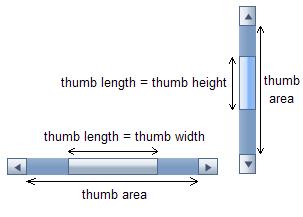
In general, the ThumbLengthProportion property determines the size of the thumb. There are also minimum and maximum constraints for the thumb's length:
-
the minimum length is given by the **MinThumbLength **property
-
the maximum length is equal to the thumb area (see the figure above)
There are 3 possible ways to set the length of the thumb:
1. Automatic length calculation(default)
Set ThumbLengthProportion to a negative value. This way the thumb length is calculated just like in Microsoft's ScrollBar:
thumb length = thumb area * LargeChange / (Maximum - Minimum + 1),
where LargeChange, Maximum and Minimum are properties of the ScrollBar.
2. Proportional length
Set the ThumbLengthProportion property to a positive value between 0 and 1. The thumb length is calculated as proportion of the thumb area:
thumb length = thumb area * ThumbLengthProportion
3. Constant length(in px)
Set ThumbLengthProportion to 0 and MinThumbLength to the number of pixels you wish the thumb length to be.