New to Telerik UI for WinForms? Start a free 30-day trial
Change popup default location
Updated over 1 year ago
Environment
| Product Version | Product | Author |
|---|---|---|
| 2021.2.511 | RadDropDownButton for WinForms | Nadya Karaivanova |
Description
By default the popup appears at the left side below the control if you are using RadDropDownButton, RadDropDownList, etc.
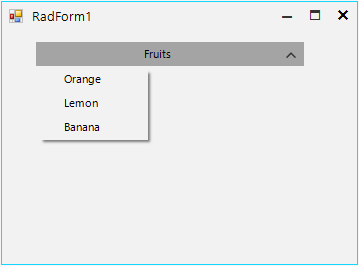
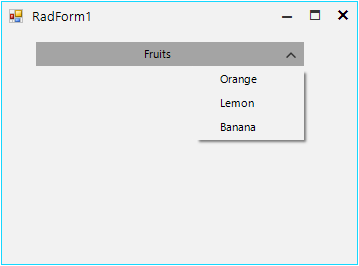
The DropDownDirection property indicates the direction in which the popup would appear: left, right, up or down. However, the user may want to show the popup on a different location, for example displaying it at the right side below the control instead of left.
This article demonstrates how you can change the location of the popup before it gets opened.
Solution
To achieve this you should handle the PopupOpening event. Then, cast the CancelEventArgs to the RadPopupOpeningEventArgs. Thus, you can use the CustomLocation property to specify the new point by calculating the exact location where you want the popup to appear:
C#
this.radDropDownButton1.DropDownButtonElement.DropDownMenu.PopupOpening += this.DropDownMenu_PopupOpening;

private void DropDownMenu_PopupOpening(object sender, CancelEventArgs args)
{
    RadPopupOpeningEventArgs eventArgs = (RadPopupOpeningEventArgs)args;
    eventArgs.CustomLocation = new Point(eventArgs.CustomLocation.X + this.radDropDownButton1.Width - this.radDropDownButton1.DropDownButtonElement.DropDownMenu.Width, eventArgs.CustomLocation.Y);
}