New to Telerik UI for WinForms? Start a free 30-day trial
How to change font in RadSaveFileDialog
Updated over 1 year ago
Environment
| Product Version | Product | Author |
|---|---|---|
| 2020.2.512 | RadSaveFileDialog for WinForms | Nadya Karaivanova |
Description
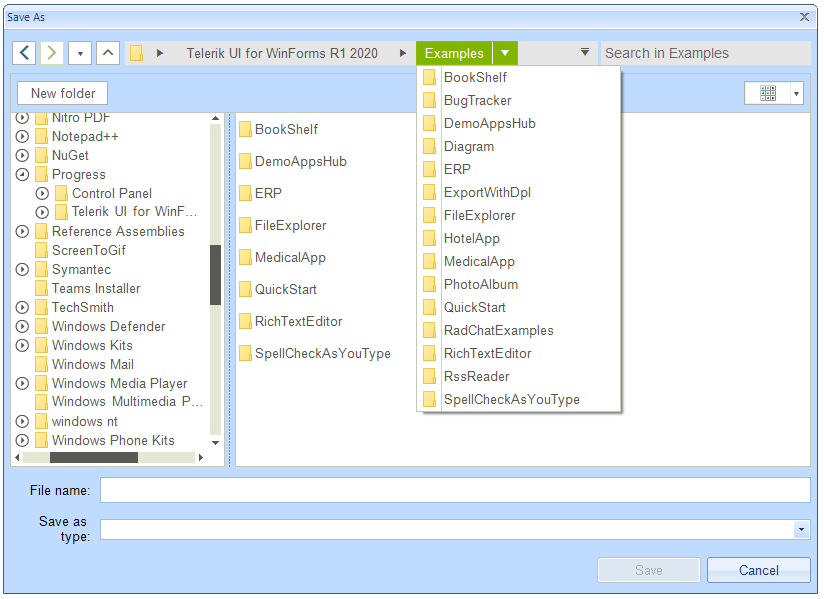
A common requirement is to change the font style and size in RadFileDialogs. Note that RadSaveFileDialog, RadOpenFileDialog, and RadOpenFolderDialog are represented by a RadForm that contains a set of elements.
Solution
The possible solution in order to change the font of a particular dialog is to iterate recursively all the controls which are contained in the respective dialog and change the font of each of them. Please note that for some controls it is enough to just set the Font property, while on others (like RadTreeView, RadListView), you will need to introduce this setting in a formatting event.
Below is illustrated an example with RadSaveFileDialog:
C#
public partial class RadForm1 : Telerik.WinControls.UI.RadForm
    {
        Font font = new Font("Arial", 10f);
        public RadForm1()
        {
            InitializeComponent();

            List<Control> controls = this.GetAllControls(radSaveFileDialog1.SaveFileDialogForm);
            controls.Add(this);
            foreach (var control in controls)
            {
                control.Font = this.font;
            }
            //RadListView
            RadListView listView = controls.FirstOrDefault(c => c is RadListView) as RadListView;
            listView.VisualItemFormatting += this.ListView_VisualItemFormatting;
            listView.CellFormatting += this.ListView_CellFormatting;

            //RadTreeView
            RadTreeView treeView = controls.FirstOrDefault(c => c is RadTreeView) as RadTreeView;
            treeView.NodeFormatting += this.TreeView_NodeFormatting;

            //RadBreadCrumb
            RadBreadCrumb breadcrumb = controls.FirstOrDefault(c => c is RadBreadCrumb) as RadBreadCrumb;
            breadcrumb.HistoryItemCreated += this.Breadcrumb_HistoryItemCreated;
            breadcrumb.AutoCompleteSuggestHelper.DropDownList.ItemDataBound += this.AutoCompleteSuggestHelperDropDownList_ItemDataBound;
            breadcrumb.SplitButtonCreated += this.Breadcrumb_SplitButtonCreated;
            breadcrumb.BreadCrumbElement.HeaderDropDownButtonElement.DropDownOpening += this.HeaderDropDownButtonElement_DropDownOpening;

            //RadDropDownButtons
            var dropDownButtons = controls.Where(c => c is RadDropDownButton);
            foreach (RadDropDownButton dropDownButton in dropDownButtons)
            {
                dropDownButton.DropDownOpening += this.DropDownButton_DropDownOpening;
            }

            radSaveFileDialog1.ShowDialog();

        }
        private void HeaderDropDownButtonElement_DropDownOpening(object sender, CancelEventArgs e)
        {
            BreadCrumbDropDownButtonElement headerButton = sender as BreadCrumbDropDownButtonElement;
            foreach (RadItem item in headerButton.Items)
            {
                item.Font = this.font;
            }
        }

        private void Breadcrumb_SplitButtonCreated(object sender, SplitButtonCreatedEventArgs e)
        {
            foreach (RadItem item in e.SplitButtonElement.Items)
            {
                item.Font = this.font;
            }
        }

        private void AutoCompleteSuggestHelperDropDownList_ItemDataBound(object sender, ListItemDataBoundEventArgs args)
        {
            args.NewItem.Font = this.font;
        }

        private void Breadcrumb_HistoryItemCreated(object sender, AssociatedMenuItemEventArgs e)
        {
            e.MenuItem.Font = this.font;
        }

        private void DropDownButton_DropDownOpening(object sender, EventArgs e)
        {
            RadDropDownButton dropDownButton = sender as RadDropDownButton;
            foreach (RadItem item in dropDownButton.Items)
            {
                item.Font = this.font;
            }
        }

        private void TreeView_NodeFormatting(object sender, TreeNodeFormattingEventArgs e)
        {
            e.NodeElement.ContentElement.Font = this.font;
        }

        private void ListView_CellFormatting(object sender, ListViewCellFormattingEventArgs e)
        {
            e.CellElement.Font = this.font;
        }

        private void ListView_VisualItemFormatting(object sender, ListViewVisualItemEventArgs e)
        {
            e.VisualItem.Font = this.font;
        }

        public List<Control> GetAllControls(Control control)
        {
            var controls = control.Controls.Cast<Control>();
            return controls.SelectMany(ctrl => GetAllControls(ctrl)).Concat(controls).ToList();
        }
    }