New to Telerik UI for WinForms? Start a free 30-day trial
How to Add a Week Selection in RadCalendar Control
Updated on Aug 27, 2026
Environment
| Product Version | Product | Author |
|---|---|---|
| 2021.3.914 | RadCalendar for WinForms | Dinko Krastev |
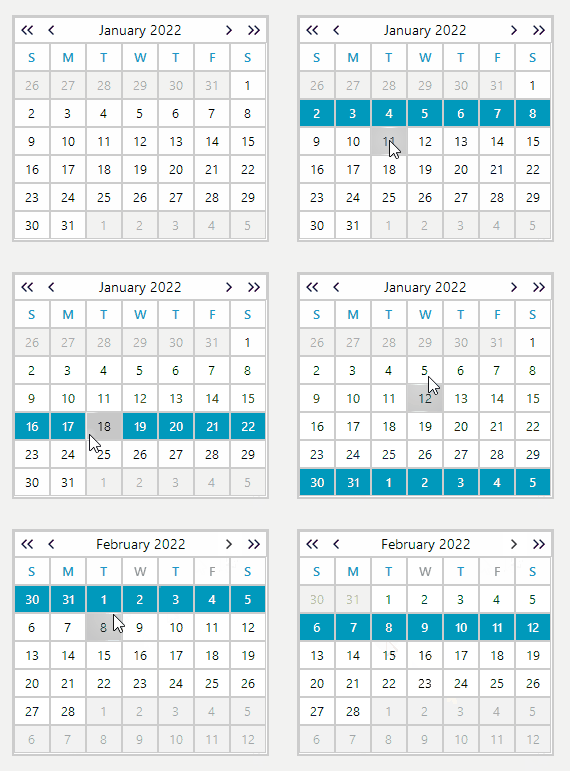
Description
In order to achieve week selection, you can clear all dates that don't belong to the week from the SelectedDates collection and select each date of the week. The following code snippet demonstrate how you can achieve this.
C#
 public partial class RadForm1 : Telerik.WinControls.UI.RadForm
    {
        public RadForm1()
        {
            InitializeComponent();
            this.radCalendar1.AllowMultipleSelect = true;
            this.radCalendar1.SelectionChanged += RadCalendar1_SelectionChanged;
        }

        private void RadCalendar1_SelectionChanged(object sender, EventArgs e)
        {
            this.radCalendar1.SelectionChanged -= RadCalendar1_SelectionChanged;
            if (this.radCalendar1.SelectedDates.Count != 1)
            {
                this.radCalendar1.SelectedDates.Clear();
            }
            DateTime startDate = radCalendar1.FocusedDate.StartOfWeek(DayOfWeek.Monday).AddDays(-1);
            DateTime endDate = startDate.AddDays(6);
            while (startDate <= endDate)
            {
                this.radCalendar1.SelectedDates.Add(startDate);
                startDate = startDate.AddDays(1);
            }

            this.radCalendar1.SelectionChanged += RadCalendar1_SelectionChanged;
        }
    }
    public static class DateTimeExtensions
    {
        public static DateTime StartOfWeek(this DateTime dt, DayOfWeek startOfWeek)
        {
            int diff = dt.DayOfWeek - startOfWeek;
            if (diff < 0)
            {
                diff += 7;
            }
            return dt.AddDays(-1 * diff).Date;
        }
    }