New to Telerik UI for WinForms? Start a free 30-day trial
Binding to a result of query
Updated on Aug 27, 2026
| Product Version | Product | Author | Last modified |
|---|---|---|---|
| Q3 2012 SP1 | RadControls for WinForms | Stefan Stefanov | 26 Dec 2012 |
PROBLEM
How to bind a control (RadGridView, RadListView, RadChartView, RadListControl, etc) to a result of a query of a DataTable
SOLUTION
The correct way to bind a control to a result of a query of a DataTable is to use the result's CopyToDataTable() method, which will copy the result in a DataTable and will return it. If you attempt to use the ToList() method, you will end up with undesired behavior where the control will display the row properties, instead of the rows data. This is caused by the fact that bind mechanism cannot reflect the DataRows information, and the DataTable is the one that handles this kind of objects.
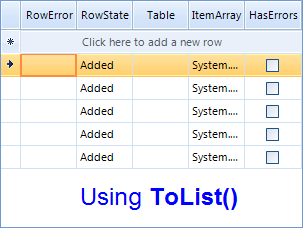
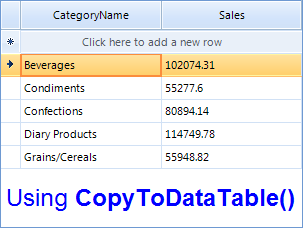
Here is a sample:
C#
DataTable table = new DataTable();
table.Columns.Add("CategoryName");
table.Columns.Add("Sales");
table.Rows.Add("Beverages", 102074.31);
table.Rows.Add("Condiments", 55277.6);
table.Rows.Add("Confections", 80894.14);
table.Rows.Add("Diary Products", 114749.78);
table.Rows.Add("Grains/Cereals", 55948.82);
table.Rows.Add("Meat/Poultry", 81338.06);
table.Rows.Add("Produce", 53019.98);
table.Rows.Add("Seafood", 65544.18);

var result = table.AsEnumerable().Take(5);
radGridView1.DataSource = result.CopyToDataTable();