New to Telerik UI for WinForms? Start a free 30-day trial
Formatting Data Cells
Updated on Aug 27, 2026
The CellFormatting event is used to add formatting to grid cells. For example, the code sample below changes the ForeColor, BackColor and GradientStyle in all data cells in the ContactTitle column if the cell value is Owner:
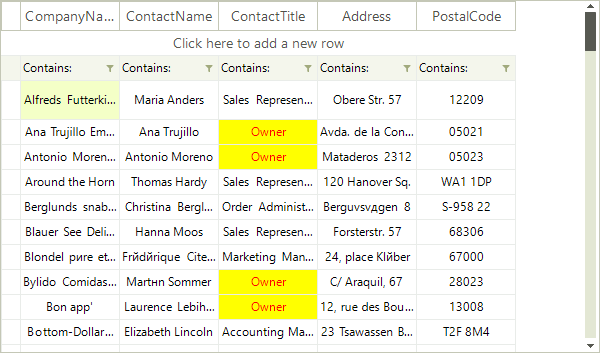
C#
private void radVirtualGrid1_CellFormatting(object sender, VirtualGridCellElementEventArgs e)
{
    if (e.CellElement.RowIndex > -1)
    {
        if (e.CellElement.ColumnIndex == 3 && e.CellElement.Value != null && e.CellElement.Value.ToString() == "Owner")
        {
            e.CellElement.DrawFill = true;
            e.CellElement.BackColor = Color.Yellow;
            e.CellElement.GradientStyle = Telerik.WinControls.GradientStyles.Solid;
            e.CellElement.ForeColor = Color.Red;
        }
        else
        {
            e.CellElement.ResetValue(LightVisualElement.DrawFillProperty, ValueResetFlags.Local);
            e.CellElement.ResetValue(LightVisualElement.BackColorProperty, ValueResetFlags.Local);
            e.CellElement.ResetValue(LightVisualElement.GradientStyleProperty, ValueResetFlags.Local);
            e.CellElement.ResetValue(LightVisualElement.ForeColorProperty, ValueResetFlags.Local);
        }
    }
}
Due to the UI virtualization in RadVirtualGrid, cell elements are created only for currently visible cells and are being reused during operations like scrolling, filtering, sorting and so on. In order to prevent applying the formatting to other columns' cell elements (because of the cell reuse) all customization should be reset for the rest of the cell elements.