Logical Keyboard Layout
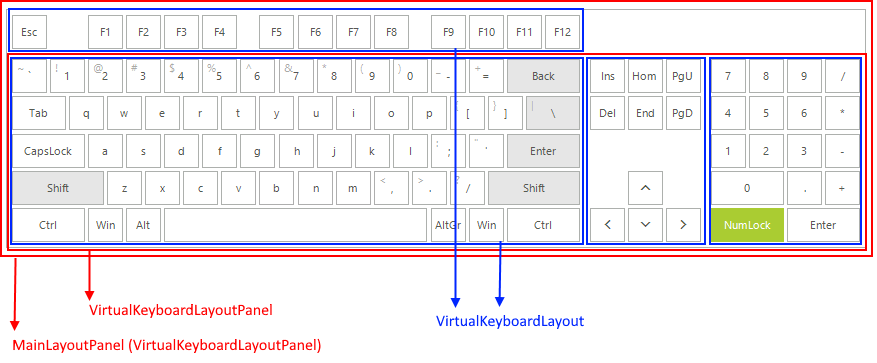
RadVirtualKeyboard.MainLayoutPanel is represented by a VirtualKeyboardLayoutPanel that hosts VirtualKeyboardLayouts and other VirtualKeyboardLayoutPanels. Each VirtualKeyboardLayout hosts the keys of the keyboard, the infrastructure to create new keys, organizes them into logical rows and contains the logical layout implementation. Hence, if you need to customize the keys that are displayed on the keyboard, it is necessary to manipulate the respective VirtualKeyboardLayout.
Depending on the applied LayoutType, the MainLayoutPanel stores in its KeyboardLayouts a set of VirtualKeyboardLayoutPanels and VirtualKeyboardLayouts. The VirtualKeyboardLayoutPanel contains a collection of VirtualKeyboardLayouts depending on how many group of keys will be created:
The VirtualKeyboardLayout offers a public Rows property which is an ObservableCollection of Row instances. Each Row represents a logical structure used to organize the keys stored in the Keys property.
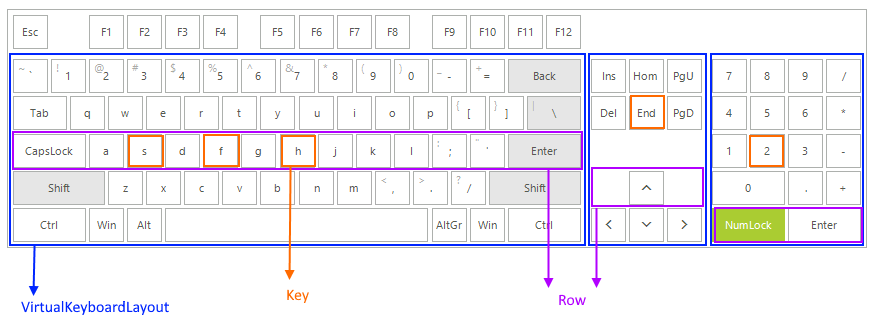
Accessing the logical layout and iterating the keys in the Home layout
this.radVirtualKeyboard1.LayoutType = Telerik.WinControls.VirtualKeyboard.KeyboardLayoutType.Extended;
ExtendedVirtualKeyboardLayoutPanel extendedKeyboard = radVirtualKeyboard1.MainLayoutPanel as ExtendedVirtualKeyboardLayoutPanel;
VirtualKeyboardLayout simplifiedLayout = extendedKeyboard.MainButtonsLayout;
VirtualKeyboardLayout homeLayout = extendedKeyboard.HomeButtonsLayout;
VirtualKeyboardLayout numpadLayout = extendedKeyboard.NumpadButtonsLayout;
StringBuilder homeKeys = new StringBuilder();
foreach (Row rows in homeLayout.Rows)
{
    foreach (IKey key in rows.Keys)
    {
        Key k = key as Key;
        if (k != null)
        {
            homeKeys.AppendLine(k.Text);
        }
    }
}
RadMessageBox.Show(homeKeys.ToString());As of R3 2021 SP1 we introduced new API, the GetAllRows and FindRowByKey methods, which don't require knowing in which LayoutPanel and the exact row which is the owner of the key, to be able to remove it.
API for Adding/Removing keys
var allKeys = this.radVirtualKeyboard1.MainLayoutPanel.GetAllKeys();
Key Qkey = allKeys.FirstOrDefault(k => k.VirtualKey == (int)Keys.Q) as Key;
Row row = this.radVirtualKeyboard1.MainLayoutPanel.FindRowByKey(Qkey);
row.Keys.Remove(Qkey);
this.radVirtualKeyboard1.MainLayoutPanel.ResetLayout(true);