Indicator Elements
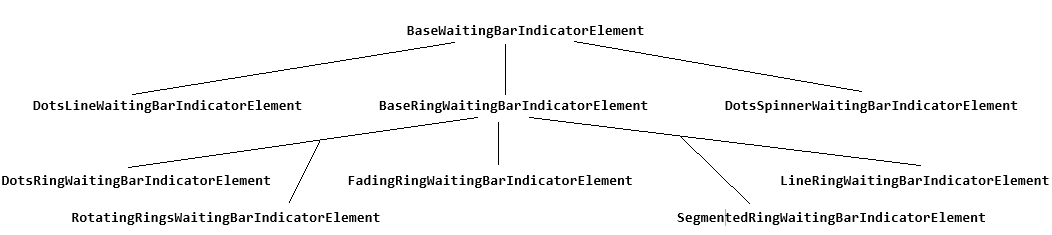
All indicators inherit from BaseWaitingBarIndicatorElement and define their own implementation of the Animate and ResetAnimation methods.
Fig.1 WaitingBar indicators' hierarchy
-
BaseWaitingBarIndicatorElement: Represents the base indicator element.
- ElementCount: Controls how many elements will be displayed.

- ElementColor: Gets or sets the color of the elements.

- ElementColor2: Gets or sets the secondary color of the elements.

-
BaseRingWaitingBarIndicatorElement: Represents the base ring indicator elements.
- InnerRadius: Controls the inner radius.

- Radius: Controls the radius.

-
RotationDirection: Determines the rotation direction.
-
Clockwise

-
CounterClockwise

-
-
ElementColor3: Gets or sets the element back color3.

-
ElementColor4: Gets or sets the element back color4.
-
ElementGradientPercentage: Gets or sets the element gradient percentage.

- ElementGradientPercentage2: Gets or sets the element gradient percentage.

-
DotsLineWaitingBarIndicatorElement: Represents accelerating dots moving in a line.

-
DotsRingWaitingBarIndicatorElement: Represents accelerating dots moving in a ring.

-
DotsSpinnerWaitingBarIndicatorElement: Represents accelerating dots like spinner.

-
FadingRingWaitingBarIndicatorElement: Represents accelerating fading ring.

-
LineRingWaitingBarIndicatorElement: Represents accelerating lines moving in a ring.

- LineThickness: Controls how thick the lines are.

-
RotatingRingsWaitingBarIndicatorElement: Represents rotating rings.

-
SegmentedRingWaitingBarIndicatorElement: Represents accelerating segments moving in a ring.