Getting Started with WinForms Rating
This tutorial will help you to quickly get started using the control.
Adding Telerik Assemblies Using NuGet
To use RadRating when working with NuGet packages, install the Telerik.UI.for.WinForms.AllControls package. The package target framework version may vary.
Read more about NuGet installation in the Install using NuGet Packages article.
With the 2025 Q1 release, the Telerik UI for WinForms has a new licensing mechanism. You can learn more about it here.
Adding Assembly References Manually
When dragging and dropping a control from the Visual Studio (VS) Toolbox onto the Form Designer, VS automatically adds the necessary assemblies. However, if you're adding the control programmatically, you'll need to manually reference the following assemblies:
- Telerik.Licensing.Runtime
- Telerik.WinControls
- Telerik.WinControls.UI
- TelerikCommon
The Telerik UI for WinForms assemblies can be install by using one of the available installation approaches.
Defining the RadRating
Below are the basic steps needed to get started with RadRating control in Visual Studio:
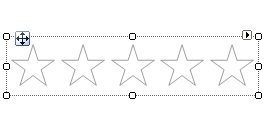
1. Drag RadRating from the Visual Studio Toolbox to the form.
-
Set the Caption to “The best movie ever”.
-
Set the SelectionMode property to HalfItem.
-
In the code behind subscribe to the ValueChanged event, where you can calculate and display the average rating:
Handling the ValueChanged event
double averageRating = 0;
int numberOfChanges = 0;

public RatingGettingStarted()
{
    InitializeComponent();

    this.radRating1.Caption = "The best movie ever";
    this.radRating1.Description = "Your rating:";
    this.radRating1.SelectionMode = Telerik.WinControls.UI.RatingSelectionMode.HalfItem;
    this.radRating1.ValueChanged += radRating1_ValueChanged;
}

private void radRating1_ValueChanged(object sender, EventArgs e)
{
    Telerik.WinControls.UI.RadRating rating = sender as Telerik.WinControls.UI.RadRating;
    if (rating != null)
    {
        averageRating += (double)rating.Value;
        numberOfChanges++;
        double result = averageRating / numberOfChanges;
        rating.Description = string.Format("Your rating: {0:F2}/{1}", result, rating.Maximum);
    }
}
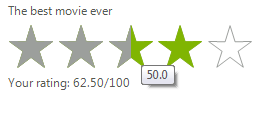
5. Press F5 to run the application.
See Also
Telerik UI for WinForms Learning Resources
- Telerik UI for WinForms Rating Component
- Getting Started with Telerik UI for WinForms Components
- Telerik UI for WinForms Setup
- Telerik UI for WinForms Converter
- Telerik UI for WinForms Visual Studio Templates
- Deploy Telerik UI for WinForms Applications
- Telerik UI for WinForms Virtual Classroom(Training Courses for Registered Users)
- Telerik UI for WinForms License Agreement)