UI Automation Support
With the Q3 2025 version of our controls, RadProgressBar supports UI Automation. The current implementation of UI Automation for RadProgressBar is based on the MS WinForms ProgressBar Control Type standard. The main goal of this implementation is to ensure compliance with accessibility standards and to provide a common practice for automated testing.
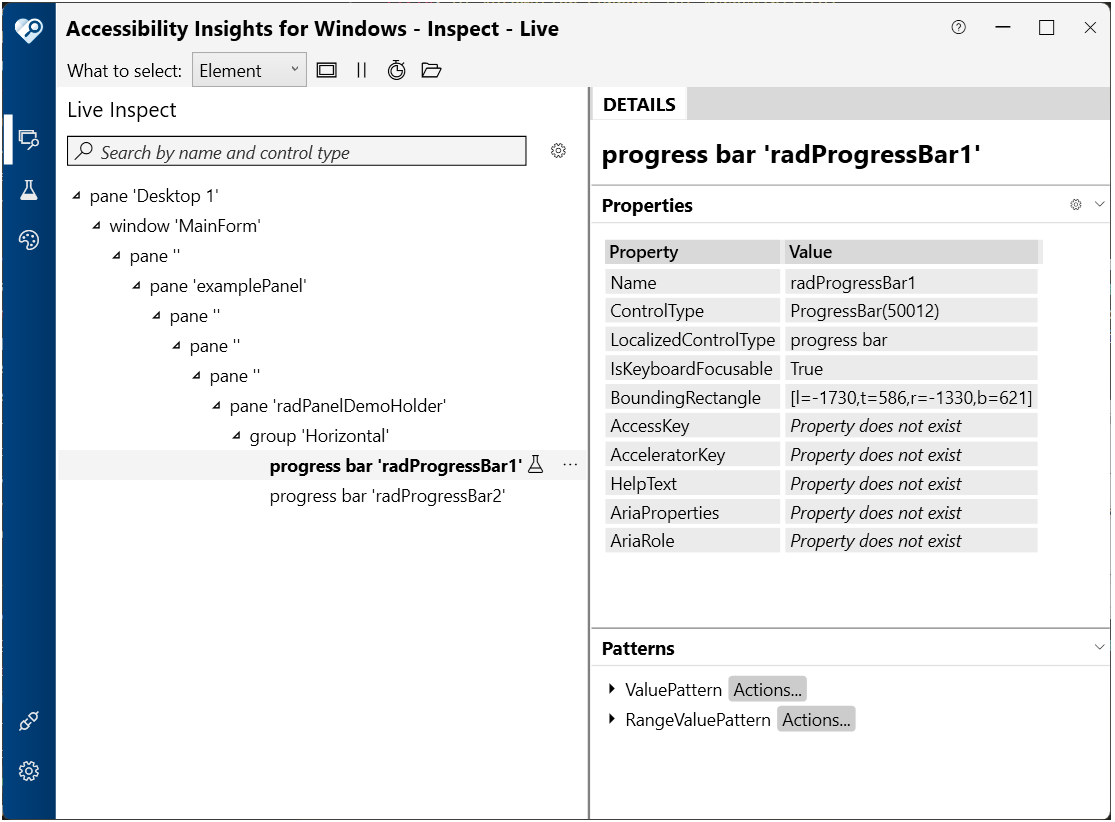
| Control View |
|---|
| └─ ProgressBar (RadProgressBar Control) |
RadProgressBar is exposed as a single UI Automation element with no child elements. The control implements the standard ProgressBar control type, making it accessible to screen readers and automation tools.
This functionality is enabled by default. To disable it, you can set the EnableUIAutomation property to false.
this.radProgressBar1.EnableUIAutomation = false;
Relevant Properties
The table below outlines the UI Automation properties most important for understanding and interacting with the RadProgressBar control.
RadProgressBarUIAutomationProvider
The RadProgressBarUIAutomationProvider is the main provider for RadProgressBar, inheriting from RadControlBaseRootUIAutomationProvider
Supported Properties
- AutomationElementIdentifiers.ControlTypeProperty.Id => ControlType.ProgressBar.Id (50012)
- AutomationElementIdentifiers.LocalizedControlTypeProperty.Id => "progress bar"
- AutomationElementIdentifiers.IsContentElementProperty.Id => true
- AutomationElementIdentifiers.IsControlElementProperty.Id => true
- AutomationElementIdentifiers.IsKeyboardFocusableProperty.Id => true
- AutomationElementIdentifiers.HelpTextProperty.Id => Owner.AccessibleDescription
- AutomationElementIdentifiers.BoundingRectangleProperty.Id => Control's screen bounds
- AutomationElementIdentifiers.IsRangeValuePatternAvailableProperty.Id => true
- AutomationElementIdentifiers.IsValuePatternAvailableProperty.Id => true
Supported Automation Patterns
The following items outline the automation patterns supported by RadProgressBarUIAutomationProvider.
Automation Events
RadProgressBar raises UI Automation property changed events when the progress value changes:
- RangeValuePatternIdentifiers.ValueProperty — Raised when Value1 changes, allowing automation clients and screen readers to be notified of progress updates in real-time