WinForms SpellChecker Overview
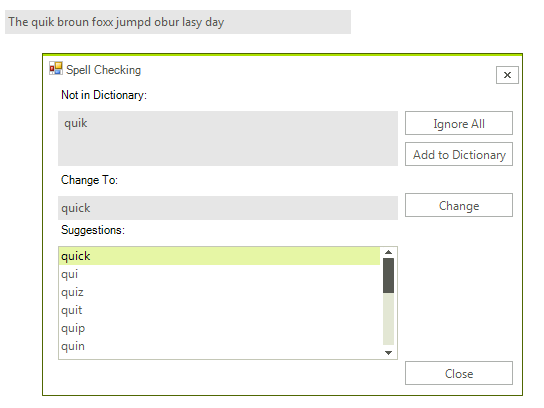
RadSpellChecker enables developers to add multilingual spell checking capabilities to their WinForms applications. The component is completely customizable and can be attached to any text-editing RadControl. You can also use it together with the standard Microsoft text-editing controls. It currently supports dozens of languages and can have custom user dictionaries for every language.
 Start Free Trial
RadSpellChecker requires .NET 4.0 Framework.
The end-user can check a given text for errors using one of the following modes:
-
Checking words one by one.
-
Checking all words at once in a separate window.
RadSpellChecker can be tweaked to:
-
Spellcheck RadGridView editors.
-
Support multiple languages – you can add dictionaries in any language and use them with RadSpellChecker.
Telerik UI for WinForms Learning Resources
- Telerik UI for WinForms SpellChecker Homepage
- Get Started with the Telerik UI for WinForms SpellChecker
- Telerik UI for WinForms API Reference
- Getting Started with Telerik UI for WinForms Components
- Telerik UI for WinForms Virtual Classroom (Training Courses for Registered Users)
- Telerik UI for WinForms Forum
- Telerik UI for WinForms Knowledge Base
Telerik UI for WinForms Additional Resources
- Telerik UI for WinForms Product Overview
- Telerik UI for WinForms Blog
- Telerik UI for WinForms Videos
- Telerik UI for WinForms Roadmap
- Telerik UI for WinForms Pricing
- Telerik UI for WinForms Code Library
- Telerik UI for WinForms Support
- What’s New in Telerik UI for WinForms