New to Telerik UI for WinForms? Start a free 30-day trial
Custom Painting
Updated on Aug 27, 2026
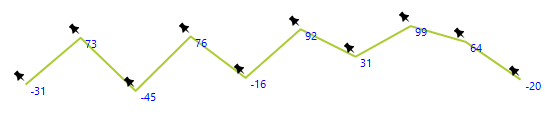
RadSparkline provides you with two events that allows to style any of the painted elements. The events are PaintSparkStroke and PaintSparkFill. The events will be fired for each element and allow you to change its properties or directly paint on the sparkline surface. The event arguments are providing the following properties:
- Cancel: Allows you to cancel the current element painting.
- Graphics: The Graphics object that allows you to paint.
- Path: The path of the current element.
- Context: The currently painted element.
- StrokePen: The default Pen used for the current element (PaintSparkStroke event only).
- FillBrush: The default Brush used for the current element (PaintSparkFill event only).
The following examples demonstrates how you can use the above events.
Using the Paint Events
C#
Font labelFont = new Font("Segoe UI", 8, FontStyle.Regular);
Image pointIcon = Image.FromFile(@"C:\img\pin.png").GetThumbnailImage(16, 16, null, IntPtr.Zero);

private void RadSparkline1_PaintSparkStroke(object sender, PaintSparkStrokeEventArgs e)
{
    if (e.Context is CategoricalSparkDataPoint)
    {
        e.Cancel = true;
        var point = new PointF(e.Path.PathPoints[0].X - 16, e.Path.PathPoints[0].Y - 16);
        e.Graphics.DrawImage(pointIcon, point);
    }
}


private void RadSparkline1_PaintSparkFill(object sender, PaintSparkFillEventArgs e)
{
    if (e.Context is CategoricalSparkDataPoint)
    {
        e.Cancel = true;

        var value = (e.Context as CategoricalSparkDataPoint).Value;
        e.Graphics.DrawString(value.ToString(), labelFont, Brushes.Blue, e.Path.PathPoints[0].X, e.Path.PathPoints[0].Y);
    }
}
Figure 1: Custom Paint