New to Telerik UI for WinForms? Start a free 30-day trial
Events and Customization
Updated on Aug 27, 2026
RadScheduler provides a set of events that allow you to customize the appearance of the printed elements:
FormattingEvents
-
PrintElementFormatting: Fires when a print element is being formatted before it is printed.
-
CellPrintElementFormatting: Fires when a cell print element is being formatted before it is printed.
-
AppointmentPrintElementFormatting: Fires when an appointment print element is being formatted before it is printed.
PaintEvents
-
PrintElementPaint: Fires when a print element is printed.
-
CellPrintElementPaint: Fires when a cell print element is printed.
-
AppointmentPrintElementPaint: Fires when an appointment print element is printed.
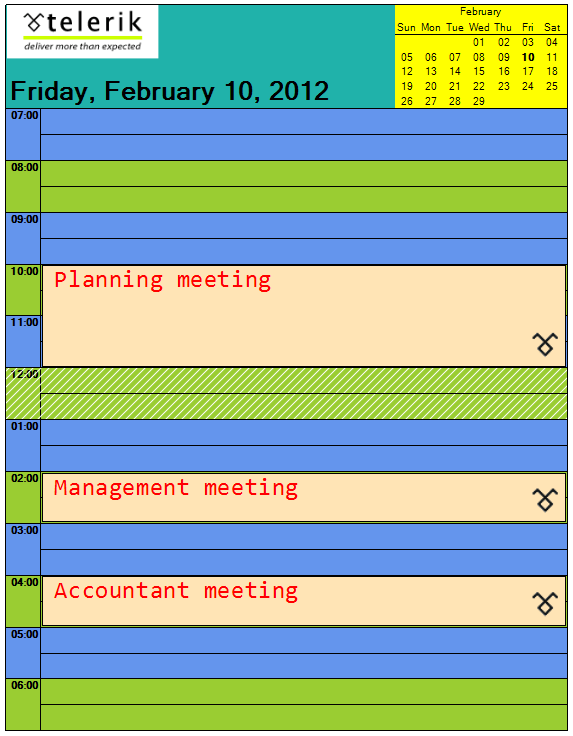
Here is an example. The comments are inline:
Figure 1: Customized Print Elements
Handle Formatting and Paint Events
C#
void radScheduler1_CellPrintElementPaint(object sender, PrintSchedulerCellPaintEventArgs e)
{
    //draw a hatch in the cell if it is 12 o'clock (lunch break)
    if (e.CellElement.Date.Hour == 12)
    {
        Brush b = new HatchBrush(HatchStyle.BackwardDiagonal, Color.White, Color.Transparent);
        e.Graphics.FillRectangle(b, e.Bounds);
    }
}

void radScheduler1_AppointmentPrintElementPaint(object sender, PrintAppointmentPaintEventArgs e)
{
    //draw an image in the bottom right corner of each appointment
    Image img = Resources.telerikLogo1;
    int imgWidth = (int)((double)img.Size.Width * 100 / (double)Graphics.FromImage(img).DpiX);
    int imgheight = (int)((double)img.Size.Height * 100 / (double)Graphics.FromImage(img).DpiX);
    e.Graphics.DrawImage(img, new Point(e.Bounds.Right - imgWidth, e.Bounds.Bottom - imgheight));
}

void radScheduler1_PrintElementPaint(object sender, PrintElementPaintEventArgs e)
{
    if (!(e.PrintElement is CalendarPrintElement))
    {
        //draw an image in the main element
        e.Graphics.DrawImage(Resources.telerikLogo, new Point(e.Bounds.X +1, e.Bounds.Y));
    }
}

void radScheduler1_PrintElementFormatting(object sender, PrintElementEventArgs e)
{
    //allow paint of the main element
    e.PrintElement.DrawFill = true;

    //set the calendar backcolor
    if (e.PrintElement is CalendarPrintElement)
    {
        e.PrintElement.BackColor = Color.Yellow;
    }
    else
    {
        //set the main element backcolor and change its text position
        e.PrintElement.BackColor = Color.LightSeaGreen;
        e.PrintElement.TextAlignment = ContentAlignment.BottomLeft;
    }
}

Font appointmentFont = new Font("Consolas", 20);
void radScheduler1_AppointmentPrintElementFormatting(object sender, PrintAppointmentEventArgs e)
{
    //customize the appointment appearance
    e.AppointmentElement.DrawFill = true;
    e.AppointmentElement.BackColor = Color.Moccasin;
    e.AppointmentElement.ForeColor = Color.Red;
    e.AppointmentElement.Font = appointmentFont;
}

void radScheduler1_CellPrintElementFormatting(object sender, Telerik.WinControls.UI.PrintSchedulerCellEventArgs e)
{
    //set different colors for cells with even and odd hours
    e.CellElement.DrawFill = true;
    if (e.CellElement.Date.Hour % 2 == 0)
    {
        e.CellElement.BackColor = Color.YellowGreen;
    }
    else
    {
        e.CellElement.BackColor = Color.CornflowerBlue;
    }
}