Handling Editors' Events
Handling Keyboard Input
In some cases you may need to perform a specific operation depending on the user input in the editor while the editor is still opened.
For example, you may need to set specific text in the editor when the user presses CTRL + D. In this case, you should subscribe to the KeyDown event of the RadTextBoxElement in the EditorInitialized event handler. The editors in RadPropertyGrid are reused, so we define a field which prevents us from subscribing to the KeyDown more than once.
How to Handle Events
public PropertyGridHandlingEditorsEvents()
{
    InitializeComponent();

    this.radPropertyGrid1.EditorInitialized += new PropertyGridItemEditorInitializedEventHandler(radPropertyGrid1_EditorInitialized);
}

bool tbSubscribed = false;

void radPropertyGrid1_EditorInitialized(object sender, PropertyGridItemEditorInitializedEventArgs e)
{
    PropertyGridTextBoxEditor editor = e.Editor as PropertyGridTextBoxEditor;

    if (editor != null)
    {
        if (!tbSubscribed)
        {
            tbSubscribed = true;
            RadTextBoxElement tbElement = (RadTextBoxElement)editor.EditorElement;
            tbElement.KeyDown += new KeyEventHandler(tbElement_KeyDown);
        }
    }
}

void tbElement_KeyDown(object sender, KeyEventArgs e)
{
    if (e.Control)
    {
        if (e.KeyCode == Keys.D)
        {
            ((RadTextBoxElement)sender).Text = "Default text";
        }
    }
}Showing Images in PropertyGridDropDownListEditor
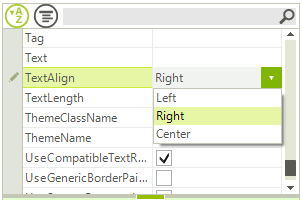
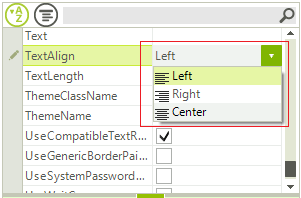
If you need to show icons next to the popup items in PropertyGridDropDownListEditor you can use the VisualItemFormatting event for the BaseDropDownListEditorElement and specify the desired image for the visual items. Subscribe to the VisualItemFormatting event in the RadPropertyGrid.EditorInitialized event:
| Default PropertyGridDropDownListEditor | PropertyGridDropDownListEditor with Icons |
|---|---|
 |  |
How to Handle Events
private void EditorInitialized(object sender, PropertyGridItemEditorInitializedEventArgs e)
{
    PropertyGridDropDownListEditor editor = e.Editor as PropertyGridDropDownListEditor;
    if (editor != null && e.Item.Name == "TextAlign")
    {
        BaseDropDownListEditorElement element = editor.EditorElement as BaseDropDownListEditorElement;
        element.VisualItemFormatting -= element_VisualItemFormatting;
        element.VisualItemFormatting += element_VisualItemFormatting;
    }
}
private void element_VisualItemFormatting(object sender, VisualItemFormattingEventArgs args)
{
    args.VisualItem.Image = GetImageByText(args.VisualItem.Text);
}

private Image GetImageByText(string align)
{
    if (align == "Left")
    {
        return Properties.Resources.Format_Align_Left;
    }
    else if (align == "Right")
    {
        return Properties.Resources.Format_Align_Right;
    }
    return Properties.Resources.Format_Align_Center;
}