Using the DataSource Property
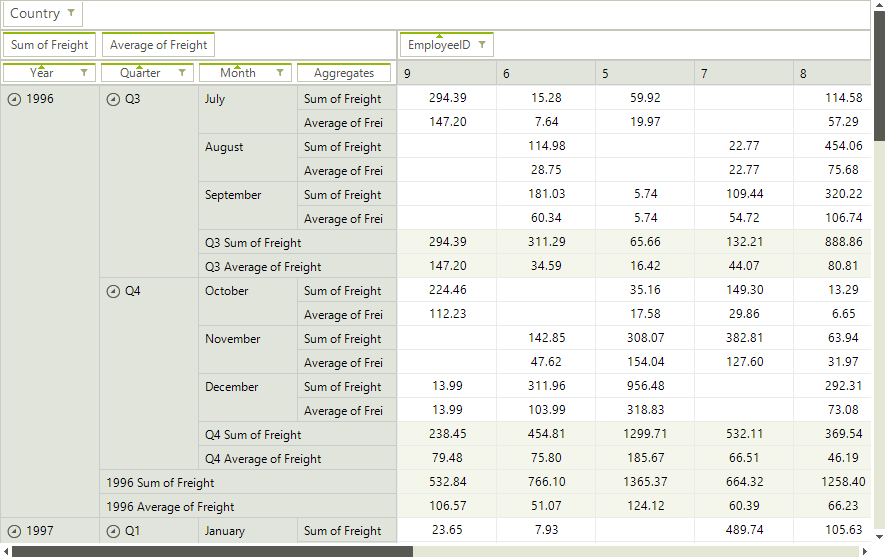
Similarly to other WinForms data controls, RadPivotGrid can be populated with data by setting its DataSource and DataMember properties. However, you also need to add the appropriate descriptions in order to define the structure of the data that is going to be displayed. More information about the different types of descriptions can be found in the Using LocalDataSourceProvider article
Setting DataSource and DataMember
this.radPivotGrid1.RowGroupDescriptions.Add(new DateTimeGroupDescription() { PropertyName = "OrderDate", Step = DateTimeStep.Year, GroupComparer = new GroupNameComparer() });
this.radPivotGrid1.RowGroupDescriptions.Add(new DateTimeGroupDescription() { PropertyName = "OrderDate", Step = DateTimeStep.Quarter, GroupComparer = new GroupNameComparer() });
this.radPivotGrid1.RowGroupDescriptions.Add(new DateTimeGroupDescription() { PropertyName = "OrderDate", Step = DateTimeStep.Month, GroupComparer = new GroupNameComparer() });

this.radPivotGrid1.ColumnGroupDescriptions.Add(new PropertyGroupDescription() { PropertyName = "EmployeeID", GroupComparer = new GrandTotalComparer() });

this.radPivotGrid1.AggregateDescriptions.Add(new PropertyAggregateDescription() { PropertyName = "Freight", AggregateFunction = AggregateFunctions.Sum });
this.radPivotGrid1.AggregateDescriptions.Add(new PropertyAggregateDescription() { PropertyName = "Freight", AggregateFunction = AggregateFunctions.Average });

this.radPivotGrid1.FilterDescriptions.Add(new PropertyFilterDescription() { PropertyName = "ShipCountry", CustomName = "Country" });

NwindDataSet dataset = new NwindDataSet();
SamplesCS.DataSources.NwindDataSetTableAdapters.OrdersTableAdapter adapter = new SamplesCS.DataSources.NwindDataSetTableAdapters.OrdersTableAdapter();
adapter.Fill(dataset.Orders);
BindingSource bs = new BindingSource();
bs.DataSource = dataset;
bs.DataMember = "Orders";
this.radPivotGrid1.DataSource = bs;When you set the DataSource and DataMember properties, RadPivotGrid will automatically prepare a LocalDataSourceProvider and use it internally.
Figure 1: RadPivot Data Binding
Localizing the Data Provider
The local data source provider is built dynamically while binding RadPivotGrid through its DataSource property. The data provider can be localized by setting its Culture property. Since the provider is created on the go, a suitable place to do this job is the handler of the RadPivotGrid.UpdatedCompleted event.
Setting Culture
public PivotGridUsingTheDataSourceProperty()
{
    InitializeComponent();
    FillWithData();

    this.radPivotGrid1.UpdateCompleted += RadPivotGrid1_UpdateCompleted;
}

private void RadPivotGrid1_UpdateCompleted(object sender, EventArgs e)
{
    this.radPivotGrid1.UpdateCompleted -= RadPivotGrid1_UpdateCompleted;
    LocalDataSourceProvider dataProvider = this.radPivotGrid1.DataProvider as LocalDataSourceProvider;
    if (dataProvider != null)
    {
        dataProvider.Culture = new System.Globalization.CultureInfo("de-DE");
        dataProvider.Refresh();
    }
}