Customizing the Dialogs
To customize the dialogs in RadPivotGrid/RadPivotFieldList, you can either inherit from them to override/extend the base functionality or you can create an entirely custom dialogs by implementing the corresponding dialog interface.
Figure 1: Custom Header Text
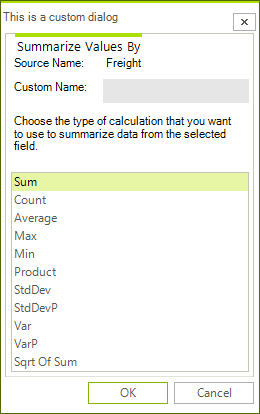
Custom AggregateOptionsDialog
The functions list displayed in the dialog can be modified. It can also be extended with custom aggregate functions. The example below adds the sample SqrtSumAggregateFunction to the list with the default functions.
The Custom Aggregation article discusses in details the API for creating custom functions as well as it includes the source code of the custom function used below.
class MyAggregateOptionsDialog : AggregateOptionsDialog
{
    public override void LoadSettings(Telerik.Pivot.Core.PropertyAggregateDescriptionBase aggregateDescription)
    {
        base.LoadSettings(aggregateDescription);
        this.Text = "This is a custom dialog";
    }

    protected override IEnumerable<object> GetDefaultAggregateFunctions(AggregateDescriptionBase aggregateDescription)
    {
        IEnumerable<object> functions = base.GetDefaultAggregateFunctions(aggregateDescription);
        IEnumerable<object> customFunctions = functions.Concat(new List<object> { new SqrtSumAggregateFunction() });

        return customFunctions;

    }
}When RadPivotGrid and RadPivotFieldList need a dialog, they use the PivotGridDialogsFactory to create an instance of a dialog. To replace the default dialogs with your custom ones, you need to implement a custom factory as show below.
Custom PivotGridDialogsFactory
class MyDialogsFactory : PivotGridDialogsFactory
{
    public override IAggregateOptionsDialog CreateAggregateOptionsDialog()
    {
        return new MyAggregateOptionsDialog();
    }
}Then, you need to assign it to RadPivotGrid and RadPivotFieldList:
Set Custom Factory
this.radPivotGrid1.DialogsFactory = new MyDialogsFactory();
this.radPivotFieldList1.DialogsFactory = new MyDialogsFactory();