Drop Down Properties
This article lists all important properties that are relevant for the drop down in RadMultiColumnComboBox.
DropDownWidth
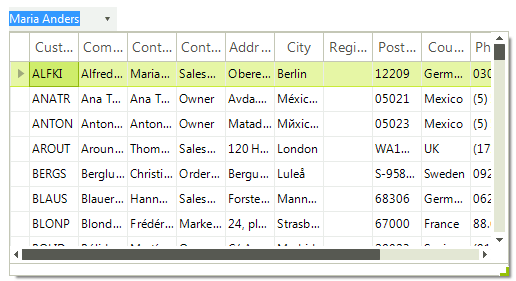
The DropDownWidth property gets or sets the width of the of the drop-down portion of RadMultiColumnComboBox.
Setting the DropDownWidth property
this.radMultiColumnComboBox1.MultiColumnComboBoxElement.DropDownWidth = 500;
Figure 1: DropDownWidth
DropDownHeight
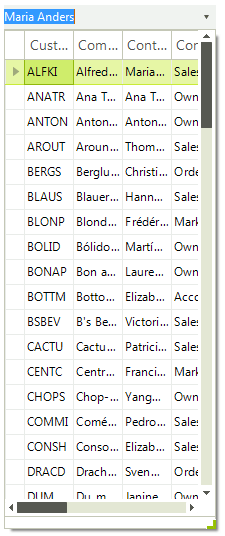
The DropDownHeight property gets or sets the height in pixels of the drop-down portion of RadMultiColumnComboBox.
Setting the DropDownHeight property
this.radMultiColumnComboBox1.MultiColumnComboBoxElement.DropDownHeight = 500;
Figure 2: DropDownHeight
AutoSizeDropDownToBestFit
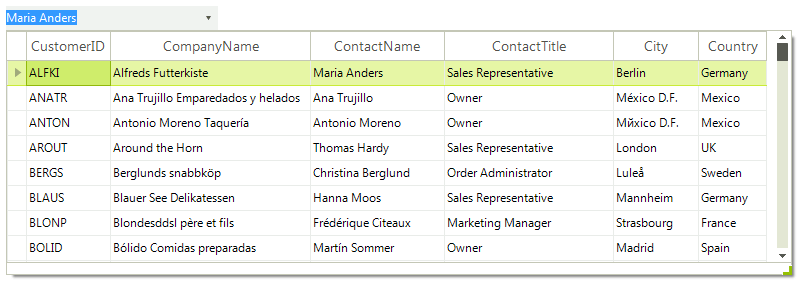
It determines whether the drop-down portion of the control will be auto-sized to best fit all columns. The DropDownWidth property must be set to its default value (-1) to allow this setting to work properly.
Figure 3: AutoSizeDropDownToBestFit
AutoSizeDropDownToBestFit
The AutoSizeDropDownToBestFit property determines whether the drop-down portion of the control will be auto-sized to best fit all columns. The DropDownWidth property must be set to its default value (-1) to allow this setting to work properly.
Autosize the drop down and best-fitting columns
this.radMultiColumnComboBox1.AutoSizeDropDownToBestFit = true;AutoSizeDropDownColumnMode
You can customize the auto-size execution of the algorithm by setting the AutoSizeDropDownColumnMode property:
-
BestFitColumnMode.None: The column width does not automatically adjust.
-
BestFitColumnMode.AllCells: The column width adjusts to fit the contents all cells in the control.
-
BestFitColumnMode.DisplayedDataCells: The column width adjusts to fit the contents of the displayed data cells.
-
BestFitColumnMode.HeaderCells: The column width adjusts to fit the contents of the header cell.
-
BestFitColumnMode.FilterCells: The column width adjusts to fit the contents of the filter cell.
-
BestFitColumnMode.SummaryRowCells: The column width adjusts to fit the contents of the summary row cell.
-
BestFitColumnMode.SystemCells: The column width adjusts to fit the contents of the system cells.
-
BestFitColumnMode.DisplayedCells: The column width adjusts to fit the contents of the displayed cells.