New to Telerik UI for WinForms? Start a free 30-day trial
Structure
Updated over 1 year ago
This article describes the inner structure and organization of the elements which build the RadApplicationMenu control.
Figure 1: RadApplicationMenu's Elements Hierarchy
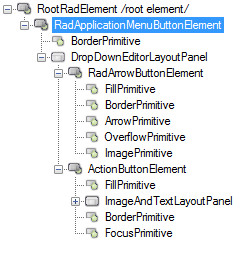
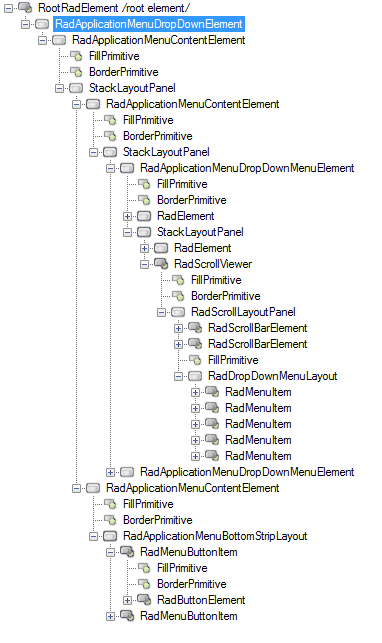
Figure 2: RadApplicationMenu visual structure
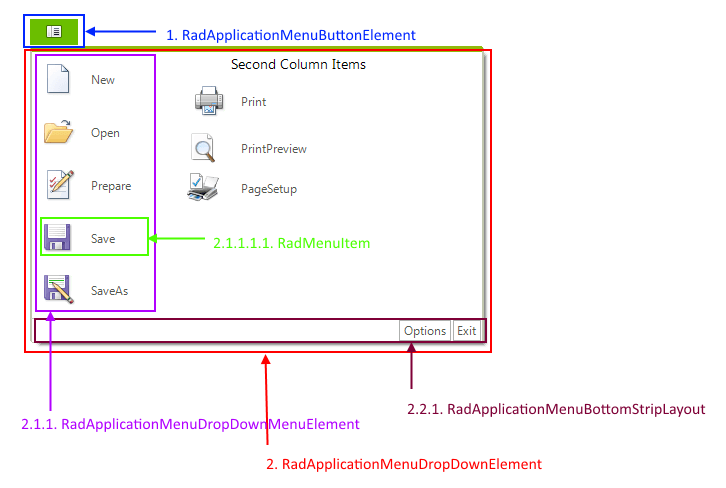
- RadApplicationMenuButtonElement: represents the application menu button element
1.1. DropDownEditorLayoutPanel
1.1.1. RadArrowButtonElement: represents the arrow button
1.1.2. ActionButtonElement: represents the button element
- RadApplicationMenuDropDownElement: represents the drop down
2.1. RadApplicationMenuContentElement
2.1.1. RadApplicationMenuDropDownMenuElement: represents the drop down menu content menu element (left and right column)
2.1.1.1. RadDropDownMenuLayout
2.1.1.1.1. RadMenuItem: represents a menu item
2.2. RadApplicationMenuContentElement :
2.2.1. RadApplicationMenuBottomStripLayout: represents the container that holds bottom button items
2.2.1.1. RadMenuButtonItem: represents the menu button item.