New to Telerik UI for WinForms? Start a free 30-day trial
Working with Line
Updated on Aug 27, 2026
This element represents a single line which can be used with the ticks.
Design Time
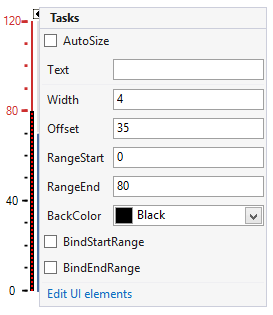
The following image shows the smart tag of the gauge control when the line is selected. You can change the line properties directly in the smart tag window.
Figure 1: Design Time
Properties
-
RangeStart: Indicates the start value of the bar.
-
RangeEnd: Indicates the end value of the bar.
-
Width: Indicates the width of the line.
-
Offset: Specifies how far to the left/bottom the element will be shifted.
-
BackColor: This property allows you to specify the color of the line.
-
BindStartRange, BindEndRange: These properties allow you to bind the start/end ranges of the line to the ones of the gauge.