UI Automation Support
With the Q1 2026 Minor version of our controls, RadTitleBar supports UI Automation. The current implementation of UI Automation for RadTitleBar is similar to the MS WinForms TitleBar Control implementation with some extended functionality. The main goal of this implementation is to ensure compliance with accessibility standards and to provide a common practice for automated testing.
| UIA Tree Structure |
|---|
| ├─ RadTitleBar (TitleBar) |
| ├── ImagePrimitive (icon if non-empty) |
| ├── TextPrimitive (caption text if non-empty) |
| ├── ButtonItem (help button if visible) |
| ├── ButtonItem (minimize button if visible) |
| ├── ButtonItem (maximize button if visible) |
| └── ButtonItem (close button if visible) |
This functionality is enabled by default. To disable it, you can set the EnableUIAutomation property to false.
this.radTitleBar1.EnableUIAutomation = false;
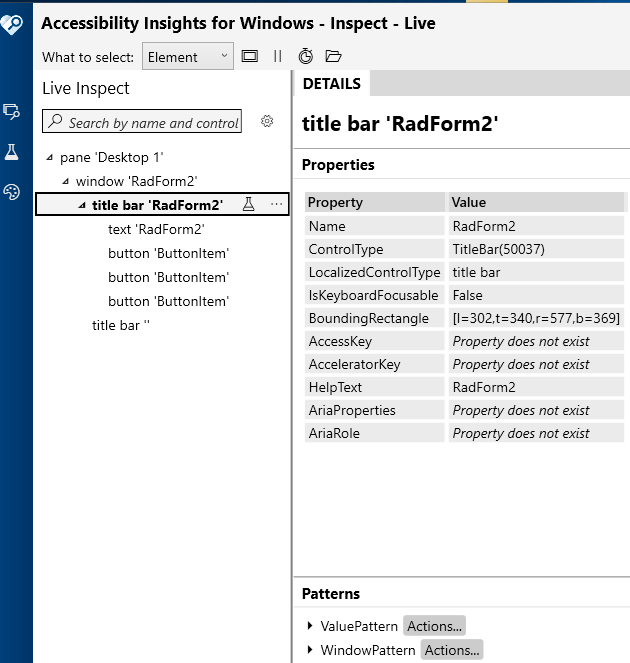
Relevant Properties
The table below outlines the UI Automation properties most important for understanding and interacting with RadTitleBar control.
RadTitleBar
- AutomationElementIdentifiers.ControlTypeProperty.Id => ControlType.TitleBar.Id
- AutomationElementIdentifiers.LocalizedControlTypeProperty.Id => "title bar"
- AutomationElementIdentifiers.NameProperty.Id
- AutomationElementIdentifiers.AutomationIdProperty.Id
- AutomationElementIdentifiers.HelpTextProperty.Id
- AutomationElementIdentifiers.IsContentElementProperty.Id => false
- AutomationElementIdentifiers.IsControlElementProperty.Id => true
- AutomationElementIdentifiers.IsKeyboardFocusableProperty.Id => false
- AutomationElementIdentifiers.IsWindowPatternAvailableProperty.Id => true
- AutomationElementIdentifiers.ClickablePointProperty.Id
- AutomationElementIdentifiers.BoundingRectangleProperty.Id
Supported Control Patterns
The following section outlines the supported automation patterns for the RadTitleBar control and its constituent elements.
Navigation
Navigation between child elements is handled entirely by TitleBarUIAService:
Navigate(FirstChild): returns the first visible child providerNavigate(LastChild): returns the last visible child providerNavigateNextSibling(child): returns the next sibling by index in the visible children listNavigatePreviousSibling(child): returns the previous sibling by index