WinForms MessageBox Overview
Updated over 1 year ago
RadMessageBox displays a modal dialog box that contains a system icon, a set of buttons, and a brief application-specific message, such as status or error information. To display a message box, call the static method RadMessageBox.Show. The title, message, buttons, and icons displayed in the message box are determined by parameters that you pass to the method.
 Start Free Trial
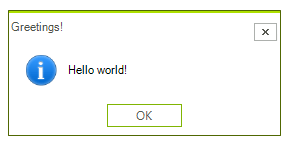
In the related Getting Started article you can find how to use the control with a sample scenario.
Download and check out the online demo at demos.telerik.com
Telerik UI for WinForms Learning Resources
- Telerik UI for WinForms MessageBox Homepage
- Get Started with the Telerik UI for WinForms MessageBox
- Telerik UI for WinForms API Reference
- Getting Started with Telerik UI for WinForms Components
- Telerik UI for WinForms Virtual Classroom (Training Courses for Registered Users)
- Telerik UI for WinForms Forum
- Telerik UI for WinForms Knowledge Base
Telerik UI for WinForms Additional Resources
- Telerik UI for WinForms Product Overview
- Telerik UI for WinForms Blog
- Telerik UI for WinForms Videos
- Telerik UI for WinForms Roadmap
- Telerik UI for WinForms Pricing
- Telerik UI for WinForms Code Library
- Telerik UI for WinForms Support
- What’s New in Telerik UI for WinForms