Structure
This article describes the inner structure and organization of the elements which build the RadDesktopAlert component.
Figure 1: RadDesktopAlert's elements hierarchy
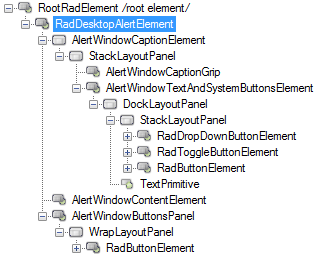
Figure 2: RadDesktopAlert's structure
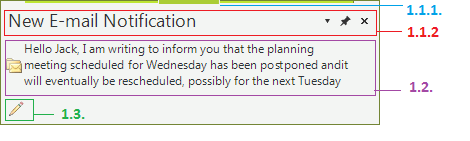
- RadDesktopAlertElement: represents the main element of a RadDesktopAlert
1.1. AlertWindowCaptionElement: represents the caption of a RadDesktopAlert. It contains a caption grip which is used to move the alert window, close button and options drop-down button.
1.1.1. AlertWindowCaptionGrip: represents the part of a RadDesktopAlert that can be used to move the component on the screen.
1.1.2. AlertWindowTextAndSystemButtonsElement: represents the part of a RadDesktopAlert that contains the text and the system buttons.
1.2. AlertWindowContentElement: represents the content of a RadDesktopAlert component.The content usually is built of an image and HTML enabled text.
1.3. AlertWindowButtonsPanel: represents the element which holds the buttons that can be added in a RadDesktopAlert window.