New to Telerik UI for WinForms? Start a free 30-day trial
Button Items
Updated on Aug 27, 2026
RadDesktopAlert supports adding custom items to the pop up by using the ButtonItems collection. The following example demonstrates how to add a label, a spin editor and a button element at the bottom of the alert:
Figure 1: RadDesktopAlert's button items
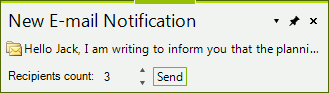
Adding elements to the ButtonItems collection
C#
public void AddButtonItems()
{
    RadLabelElement labelElement = new RadLabelElement();
    labelElement.Text = "Recipients count: ";
    labelElement.Padding = new System.Windows.Forms.Padding(0, 5, 0, 0);
    RadButtonElement buttonElement = new RadButtonElement();
    buttonElement.Text = "Send";
    buttonElement.Click += ButtonElement_Click;
    RadSpinEditorElement spinElement = new RadSpinEditorElement();
    spinElement.MinSize = new Size(50, 20);
    this.radDesktopAlert1.ButtonItems.Add(labelElement);
    this.radDesktopAlert1.ButtonItems.Add(spinElement);
    this.radDesktopAlert1.ButtonItems.Add(buttonElement);
}

private void ButtonElement_Click(object sender, EventArgs e)
{
    //TODO
}