New to Telerik UI for WinForms? Start a free 30-day trial
Customize the control context menu
Updated on May 7, 2026
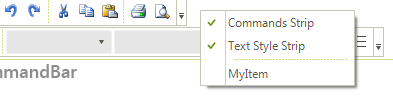
When the RadCommandBar control is right clicked, a context menu enlisting the strips in the control together with Customize menu option (allowing to customize the strips) is being shown. This context menu is being populated by the time of its opening and in order to customize its items, you should do that from within the DropDownOpening event of this context menu. Here is how to subscribe to this event and how add your custom item and how to remove the Customize option:
C#
radCommandBar1.CustomizeContextMenu.DropDownOpening += new CancelEventHandler(CustomizeContextMenu_DropDownOpening);C#
void CustomizeContextMenu_DropDownOpening(object sender, CancelEventArgs e)
{
    //add custom item
    RadMenuItem myItem = new RadMenuItem("MyItem");
    radCommandBar1.CustomizeContextMenu.Items.Add(myItem);

    //remove the customize menu option
    for (int i = 0; i < radCommandBar1.CustomizeContextMenu.Items.Count; i++)
			{
        if ( radCommandBar1.CustomizeContextMenu.Items[i].Text == "Customize...")
        {
            radCommandBar1.CustomizeContextMenu.Items.RemoveAt(i);
        }
    }
}Figure 1: CustomizeContextMenu