WinForms Chat Multi-Line Input Editor
RadChat features a multi-line input editor that automatically grows as the user types, accommodating longer messages without requiring manual resizing. The input text box starts as a single line and expands vertically up to a configurable maximum number of lines before displaying a scrollbar.
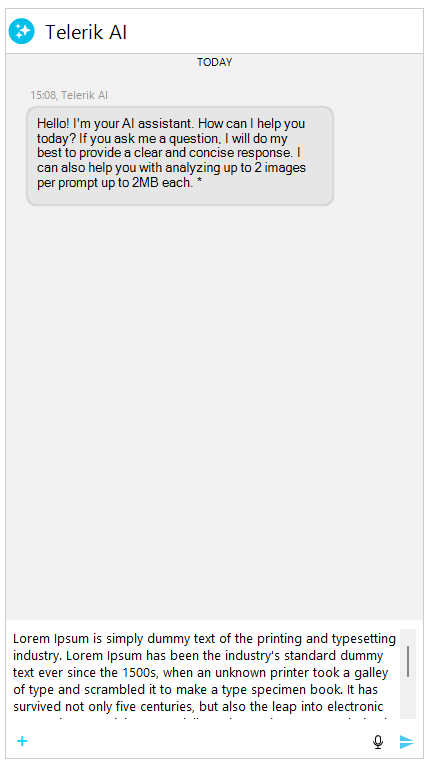
Key Behaviors
The multi-line input editor in RadChat provides the following behaviors:
- Auto-grow — the input area expands vertically as the user types or pastes text that wraps to new lines.
- Maximum visible lines — once the content exceeds the configured line limit (default: 5), a vertical scrollbar appears instead of further expanding.
- Word wrap — long lines wrap automatically within the available width.
- New line insertion — pressing
Shift+Enterinserts a new line. PressingEnteralone sends the message.
Configuring Maximum Input Lines
The MaxInputLines property on the InputTextBox element controls how many lines the editor displays before showing a scrollbar. The default value is 5.
Setting the maximum input lines
ChatInputTextBoxElement inputBox = (ChatInputTextBoxElement)this.radChat1.ChatElement.InputTextBox;
inputBox.MaxInputLines = 8;Setting MaxInputLines to 1 effectively disables auto-grow and keeps the input as a single-line text box with horizontal scrolling.
You can also access this property through the PromptInputElement:
Setting maximum input lines via PromptInputElement
this.radChat1.ChatElement.PromptInputElement.MaxInputLines = 10;Keyboard Interaction
The multi-line editor uses the following keyboard shortcuts:
| Key Combination | Action |
|---|---|
| Enter | Sends the current message (text and any attached files). |
| Shift+Enter | Inserts a new line at the current caret position. |
| Ctrl+V | Pastes text content. If the clipboard contains an image, it is sent as a ChatMediaMessage. |
Accessing the Input Text Box
The input text box is exposed as a RadTextBoxElement through the RadChat.ChatElement.InputTextBox property. The underlying implementation is the ChatInputTextBoxElement class which extends RadTextBoxElement with auto-grow capabilities.
Accessing and customizing the input text box
RadTextBoxElement inputTextBox = this.radChat1.ChatElement.InputTextBox;
inputTextBox.Font = new Font("Segoe UI", 11f);
inputTextBox.TextBoxItem.NullText = "Write your message here...";