New to Telerik UI for WinForms? Start a free 30-day trial
Binding to XML Directly at Run-Time
Updated over 1 year ago
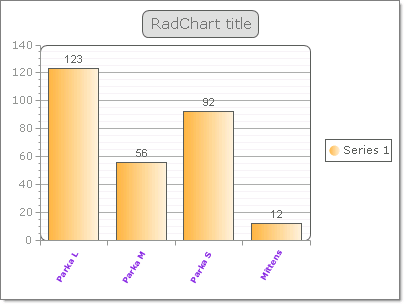
The example below demonstrates binding RadChart to an XML file:
C#
RadChart radChart1 = new RadChart();
public DataBindingToXMLAtRunTime()
{
    this.Controls.Add(radChart1);
    InitializeComponent();
    // assign the data source
    radChart1.DataBound += new EventHandler<EventArgs>(radChart1_DataBound);
    radChart1.DataSource = "..\\..\\Chart\\ChartXML.xml";
}
void radChart1_DataBound(object sender, EventArgs e)
{
    radChart1.Series[0].DataYColumn = "QuantityInStock";
    radChart1.PlotArea.XAxis.DataLabelsColumn = "Name";
    // assign appearance related properties
    radChart1.PlotArea.XAxis.Appearance.LabelAppearance.RotationAngle = 300;
    radChart1.PlotArea.XAxis.Appearance.TextAppearance.TextProperties.Font = new System.Drawing.Font("Verdana", 6, System.Drawing.FontStyle.Bold);
    radChart1.PlotArea.XAxis.Appearance.TextAppearance.TextProperties.Color = System.Drawing.Color.BlueViolet;
    radChart1.PlotArea.Appearance.Dimensions.Margins.Bottom = Telerik.Charting.Styles.Unit.Percentage(20);
}
The running application looks something like the figure shown below.