Formatting Items
Items appearance in RadCardView can be customized by making use of the CardViewItemFormatting event. The following example, demonstrates how you can change the color of an item which is being selected.
By using this event to customize the items appearance, you should always provide an else clause, where you reset the appearance settings which you have introduced. This is necessary since RadCardView uses data virtualization, which might lead to unpredicted appearance results when items are being reused.
Formatting the Visual Item
The appearance of the visual items can be fully customized by handling the CardViewItemFormatting event.
Figure 1: Formatting the Visual Item
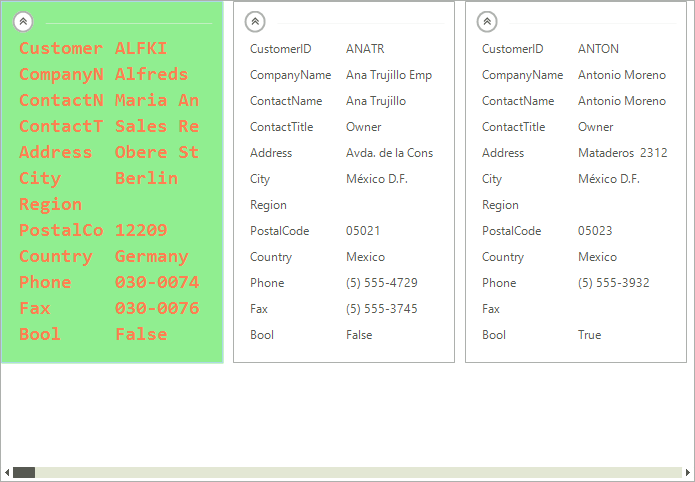
Formatting the Visual Item
Font font = new Font("Consolas", 14, FontStyle.Bold);
private void radCardView1_CardViewItemFormatting(object sender, CardViewItemFormattingEventArgs e)
{
    if (e.VisualItem.Selected)
    {
        e.VisualItem.NumberOfColors = 1;
        e.VisualItem.BackColor = Color.LightGreen;
        e.VisualItem.ForeColor = Color.Coral;
        e.VisualItem.BorderColor = Color.LightBlue;
        e.VisualItem.Font = font;
    }
    else
    {
        e.VisualItem.ResetValue(LightVisualElement.NumberOfColorsProperty, Telerik.WinControls.ValueResetFlags.Local);
        e.VisualItem.ResetValue(LightVisualElement.BackColorProperty, Telerik.WinControls.ValueResetFlags.Local);
        e.VisualItem.ResetValue(LightVisualElement.ForeColorProperty, Telerik.WinControls.ValueResetFlags.Local);
        e.VisualItem.ResetValue(LightVisualElement.BorderColorProperty, Telerik.WinControls.ValueResetFlags.Local);
        e.VisualItem.ResetValue(LightVisualElement.FontProperty, Telerik.WinControls.ValueResetFlags.Local);
    }
}Formatting CardViewItem
By handling the CardViewItemFormatting event each of the individual card view items can be customized as well.
Figure 2: Formatting CardViewItem
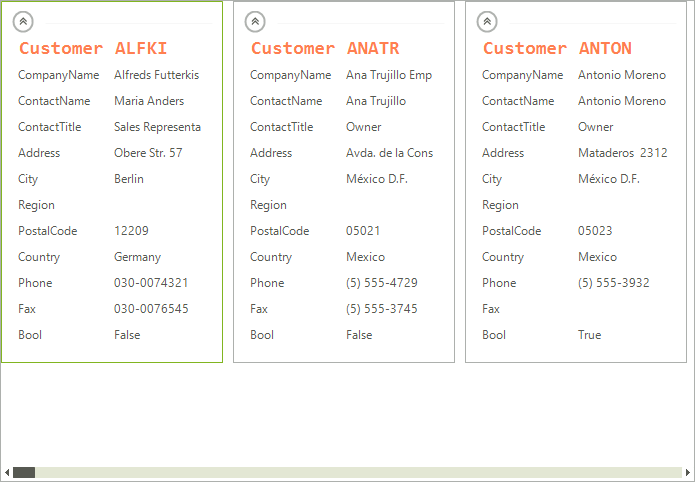
Formatting CardViewItem
private void radCardView1_CardViewItemFormatting1(object sender, CardViewItemFormattingEventArgs e)
{
    CardViewItem item = e.Item as CardViewItem;
    if (item != null && item.FieldName == "CustomerID")
    {
        e.Item.NumberOfColors = 1;
        e.Item.ForeColor = Color.Coral;
        e.Item.BorderColor = Color.LightBlue;
        e.Item.Font = font;
    }
    else
    {
        e.Item.ResetValue(LightVisualElement.NumberOfColorsProperty, Telerik.WinControls.ValueResetFlags.Local);
        e.Item.ResetValue(LightVisualElement.ForeColorProperty, Telerik.WinControls.ValueResetFlags.Local);
        e.Item.ResetValue(LightVisualElement.BorderColorProperty, Telerik.WinControls.ValueResetFlags.Local);
        e.Item.ResetValue(LightVisualElement.FontProperty, Telerik.WinControls.ValueResetFlags.Local);
    }
}See Also
Getting Started Structure Visual Data Representation Custom Items