New to Telerik UI for WinForms? Start a free 30-day trial
Customizing Zoom Navigation
Updated on May 7, 2026
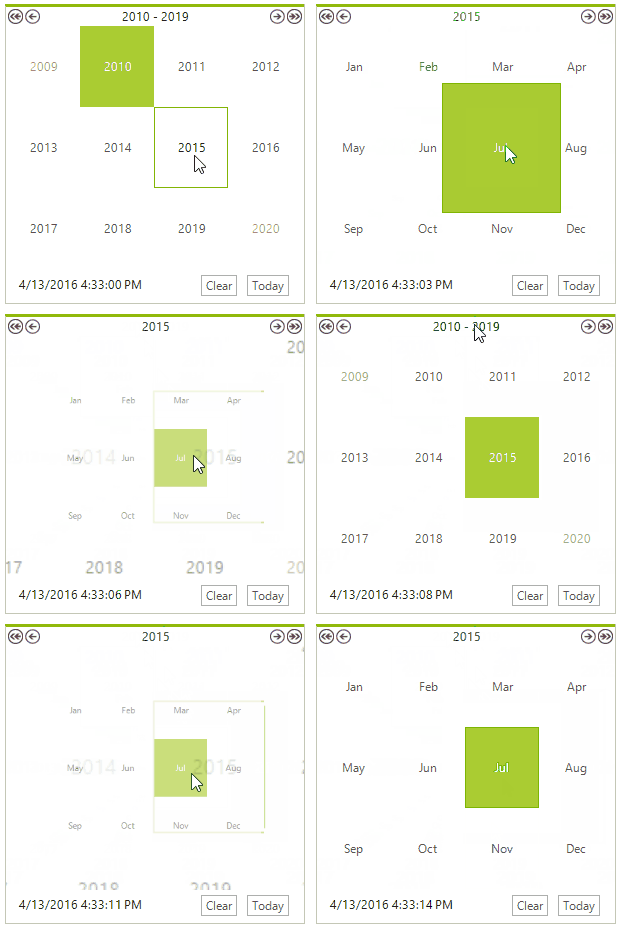
This article will guide you through the process of creating a month-year picker. For this purpose, it is necessary to set the HeaderNavigationMode property to HeaderNavigationMode.Zoom and set the ZoomLevel property to ZoomLevel.Months. This will allow the user to select a specific CalendarCellElement and navigate upwards/downwards in the RadCalendar similar to Windows calendar.
C#
this.radCalendar1.HeaderNavigationMode = HeaderNavigationMode.Zoom;
this.radCalendar1.ZoomLevel = ZoomLevel.Months;

this.radCalendar1.ZoomChanging += new CalendarZoomChangingEventHandler(radCalendar1_ZoomChanging);
In addition, you should subscribe to the ZoomChanging event and stop navigation from the currently selected month to its days representation and from a year to a range of years.
C#
void radCalendar1_ZoomChanging(object sender, CalendarZoomChangingEventArgs e)
{
    if (this.radCalendar1.ZoomLevel == ZoomLevel.Years && e.Direction == DrillDirection.Up)
    {
        e.Cancel = true;
    }
    if (this.radCalendar1.ZoomLevel == ZoomLevel.Months && e.Direction == DrillDirection.Down)
    {
        e.Cancel = true;
    }
}Figure 1: The zoom level is limited to months.