New to Telerik UI for WinForms? Start a free 30-day trial
Custom Functions
Updated on Aug 27, 2026
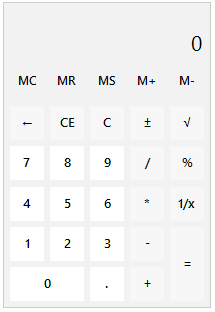
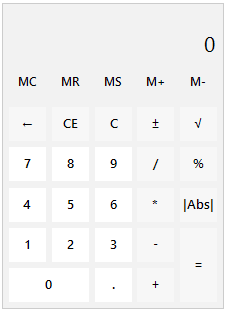
This article aims to show a sample approach how to create a custom function, |Abs|, for returning the absolute value of the current entry in the calculator. The |Abs| button will replace the 1/x button:
| Default functions | Custom function |
|---|---|
 |  |
The exact implementation of the custom calculation is just a sample approach. It may be customized according to the specific custom requirements that need to be covered.
C#
public class CustomCalculator : RadCalculator
{
    public override string ThemeClassName
    {
get
{
    return typeof(RadCalculator).FullName;
}
    }
    protected override RadCalculatorElement CreateCalculatorElement()
    {
return new CustomRadCalculatorElement();
    }
}

public class CustomRadCalculatorElement : RadCalculatorElement
{
    protected override Type ThemeEffectiveType
    {
get
{
    return typeof(RadCalculatorElement);
}
    }

    protected override RadCalculatorContentElement CreateContentElement()
    {
return new CustomRadCalculatorContentElement(this);
    }
}

public class CustomRadCalculatorContentElement : RadCalculatorContentElement
{
    public CustomRadCalculatorContentElement(ICalculatorElement owner) : base(owner)
    {
    }

    protected override void CreateChildElements()
    {
base.CreateChildElements();
this.ButtonReciprocal.Visibility = ElementVisibility.Collapsed;
RadCalculatorOperationButtonElement button = new RadCalculatorOperationButtonElement("|Abs|", CalculatorAction.None);
button.SetValue(Telerik.WinControls.Layouts.GridLayout.RowIndexProperty, 3);
button.SetValue(Telerik.WinControls.Layouts.GridLayout.ColumnIndexProperty, 4);
button.Click += Button_Click;
button.SetValue(Telerik.WinControls.Layouts.GridLayout.CellPaddingProperty, new Padding(3));
this.GridLayout.Children.Add(button);
    }

    private void Button_Click(object sender, EventArgs e)
    {
RadCalculatorElement calcElement = this.Owner as RadCalculatorElement;

decimal entry = 0;
if (decimal.TryParse(calcElement.CalculationBehavior.DisplayedValue, out entry))
{
    calcElement.CalculationBehavior.ClearEverything();
    calcElement.CalculationBehavior.ClearStacksAndHistory();
    calcElement.CalculationBehavior.Value = Math.Abs(entry);
    calcElement.CalculationBehavior.DisplayedValue = calcElement.CalculationBehavior.Value.ToString(calcElement.Culture);
}
    }
}