New to Telerik UI for WinForms? Start a free 30-day trial
Structure
Updated over 1 year ago
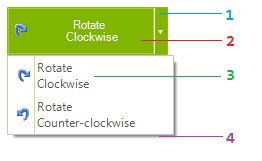
This article will show the internal elements structure of RadSplitButton:
Figure 1: RadDropDownButton's elements hierarchy
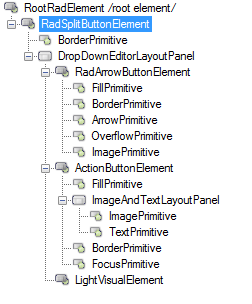
- RadArrowButtonElement: represents the arrow button that opens the popup
- ActionButtonElement: represents the action button element
- RadMenuItem: represents the drop down item
- RadDropDownButtonPopup: represents the drop down
Figure 2: RadDropDownButton's structure