TimeSpanPicker Styling
The TimeSpanPicker control for .NET MAUI provides styling options for customizing its appearance. You can style the TimeSpanPicker itself, as well as its popup or dropdown depending on the PickerMode setting.
The control supports the following styling properties:
BackgroundColor—Defines the background color of the picker.BorderColor—Defines the border color of the picker.BorderThickness—Specifies the border thickness of the picker. The default value isnew Thickness(0,0,0,1).CornerRadius—Specifies the corner radius of the picker.ClearButtonStyle(of typeStylewith target typeRadButton)—Defines the style applied to the Clear button.ToggleButtonStyle(of typeStylewith target typeRadButton)—Specifies the style of the Toggle button.PlaceholderLabelStyle(of typeStylewith target typeLabel)—Defines the style applied to the placeholder label.DisplayLabelStyle(of typeStylewith target typeLabel)—Defines the style applied to the label which is visualized when a time duration is selected.
The following Style properties are related to the spinner controls inside the popup/dropdown:
SpinnerStyle(of typeStylewith target typetelerik:RadSpinner)—Defines the style applied to the spinner item and the selected item interval.SpinnerHeaderStyle(of typeStylewith target typeLabel)—Specifies the style applied to the spinner header labels.SelectionHighlightStyle(of typeStylewith target typetelerikPrimitives:RadBorder)—Specifies the style applied to the selection inside the popup.
Namespaces
When defining some of these styles, you will need to include additional namespaces, so that the target types are properly resolved.
If you use SelectionHighlightStyle, you need to add the following namespace:
xmlns:telerik="http://schemas.telerik.com/2022/xaml/maui"If you use SpinnerStyle, you need to add the following namespace:
xmlns:telerik="http://schemas.telerik.com/2022/xaml/maui"Example
The following example shows how the styling properties are applied.
Let's have the following TimeSpan Picker definition:
<telerik:RadTimeSpanPicker BorderColor="#8660C5"
                           SpinnerHeaderStyle="{StaticResource spinnerHeaderStyle}"
                           SpinnerStyle="{StaticResource spinnerStyle}"
                           SelectionHighlightStyle="{StaticResource selectionHighlightStyle}"
                           DisplayLabelStyle="{StaticResource displayLabelStyle}"
                           PlaceholderLabelStyle="{StaticResource placeholderLabelStyle}"
                           ClearButtonStyle="{StaticResource clearButtonStyle}"
                           ToggleButtonStyle="{StaticResource toggleButtonStyle}"
                           IsClearButtonVisible="True"
                           IsToggleButtonVisible="True"
                           AutomationId="timeSpanPicker"/>
And here are how the styles are defined in the page resources.
Spinner Style
<Style TargetType="telerik:RadSpinner" x:Key="spinnerStyle">
    <Setter Property="ItemStyle">
        <Setter.Value>
            <Style TargetType="telerik:SpinnerItemView">
                <Setter Property="TextColor" Value="#797979" />
                <Setter Property="BackgroundColor" Value="#F2F2F2" />
                <Setter Property="CornerRadius" Value="10" />
                <Setter Property="Margin" Value="6, 4" />
            </Style>
        </Setter.Value>
    </Setter>
    <Setter Property="SelectedItemStyle">
        <Setter.Value>
            <Style TargetType="telerik:SpinnerItemView">
                <Setter Property="TextColor" Value="#00B5DC" />
                <Setter Property="BackgroundColor" Value="#E4F3F9" />
                <Setter Property="CornerRadius" Value="10" />
                <Setter Property="Margin" Value="6, 4" />
            </Style>
        </Setter.Value>
    </Setter>
</Style>
SpinnerHeader Style
<Style TargetType="Label" x:Key="spinnerHeaderStyle">
    <Setter Property="TextColor" Value="Black"/>
    <Setter Property="FontAttributes" Value="Bold"/>
    <Setter Property="HorizontalOptions" Value="FillAndExpand"/>
    <Setter Property="VerticalOptions" Value="FillAndExpand"/>
    <Setter Property="HorizontalTextAlignment" Value="Center"/>
    <Setter Property="VerticalTextAlignment" Value="Center"/>
</Style>
SelectionHighlight Style
 <Style TargetType="telerik:RadBorder" x:Key="selectionHighlightStyle">
    <Setter Property="BorderColor" Value="#00B5DC"/>
    <Setter Property="BorderThickness" Value="1"/>
    <Setter Property="Padding" Value="0,6,0,6"/>
    <Setter Property="HeightRequest" Value="40"/>
    <Setter Property="VerticalOptions" Value="Center"/>
    <Setter Property="BackgroundColor" Value="#F9F9F9"/>
</Style>
PlaceholderLabel Style
<Style TargetType="Label" x:Key="placeholderLabelStyle">
    <Setter Property="TextColor" Value="#1188FF"/>
    <Setter Property="VerticalTextAlignment" Value="Center"/>
    <Setter Property="HorizontalTextAlignment" Value="Center"/>
    <Setter Property="HeightRequest" Value="50"/>
</Style>
DisplayLabel Style
<Style TargetType="Label" x:Key="displayLabelStyle">
    <Setter Property="TextColor" Value="#1188FF"/>
    <Setter Property="VerticalTextAlignment" Value="Center"/>
    <Setter Property="HorizontalTextAlignment" Value="Center"/>
    <Setter Property="HeightRequest" Value="50"/>
</Style>
Namespaces
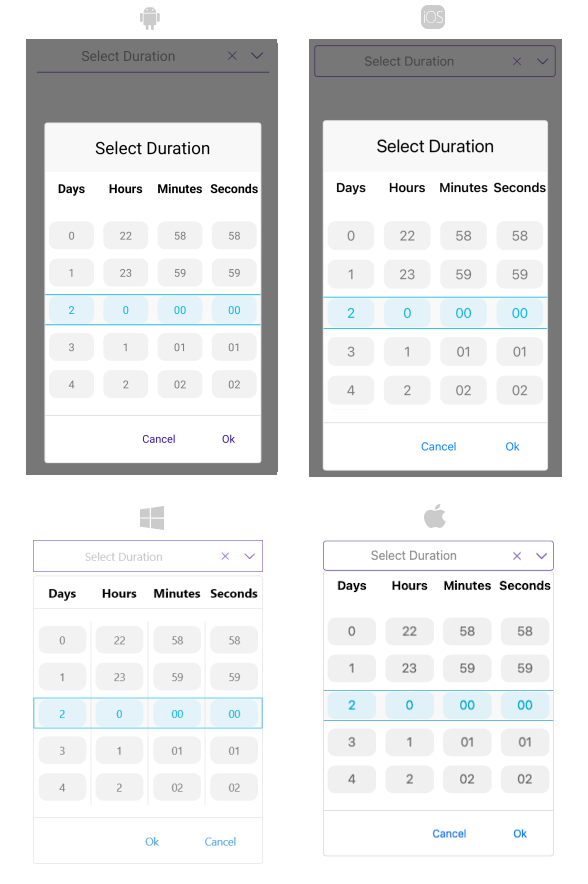
xmlns:telerik="http://schemas.telerik.com/2022/xaml/maui"This is how the TimeSpanPicker control looks when the styles described above are applied: