New to Telerik UI for .NET MAUI? Start a free 30-day trial
.NET MAUI CheckBox Visual Structure
Updated on Aug 20, 2026
The visual structure of the .NET MAUI CheckBox represents the anatomy of the UI component. Being familiar with the visual elements of the CheckBox allows you to quickly find the information required to configure them.
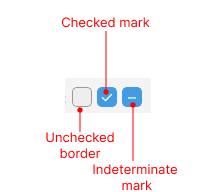
The following image shows the anatomy of the CheckBox.
Displayed Elements
- Checked mark—The mark that indicates whether the CheckBox is checked.
- Unchecked border—When the CheckBox is unchecked, this border is displayed around the Checked mark area.
- Indeterminate mark—The mark that indicates whether the CheckBox is in an indeterminate state.