or
1 answer
80 views
Hi,
I have tree list view, when user mouse hover on particular cells of column, I want to generate a pup up to showing elements.It is working fine, but if there are so many elements in the pup up, it will crush and stop run anything.Can anyone help?
Thanks,
Fendy
I have tree list view, when user mouse hover on particular cells of column, I want to generate a pup up to showing elements.It is working fine, but if there are so many elements in the pup up, it will crush and stop run anything.Can anyone help?
<telerik:GridViewDataColumn Header="Name" DataMemberBinding="{Binding Name, Converter={StaticResource InsensitiveRevConverter}}"> <telerik:GridViewDataColumn.CellTemplate> <DataTemplate> <StackPanel Orientation="Horizontal" > <Image Source="{Binding Image}" /> <TextBlock x:Name="ShowELementPupUp" Text="{Binding Name}" /> <Popup PlacementTarget="{Binding ElementName=ShowELementPupUp}" Style="{StaticResource TooltipPopupStyle}" PopupAnimation="Scroll" > <telerik:RadGridView x:Name="RadGridViewOfPopUp" Visibility="{Binding ShowElements}" AllowDrop="True" AutoGenerateColumns="False" CanUserFreezeColumns="False" CanUserInsertRows="False" CanUserReorderColumns="False" CanUserSortColumns="False" CanUserDeleteRows="False" ShowGroupPanel="False" GridLinesVisibility="None" RowIndicatorVisibility="Collapsed" ShowColumnHeaders="False"> <telerik:RadGridView.Columns> <telerik:GridViewDataColumn DataMemberBinding="{Binding Name, Mode=OneWay}" /> <telerik:GridViewDataColumn MinWidth="20" DataMemberBinding="{Binding UnweightedPercentage, Mode=OneWay}"/> </telerik:RadGridView.Columns> </telerik:RadGridView> </Popup> </StackPanel> </DataTemplate> </telerik:GridViewDataColumn.CellTemplate> </telerik:GridViewDataColumn>Thanks,
Fendy

Vlad
Telerik team

answered
on
31 Aug 2011
1 answer
148 views
Hello Telerik Team,
My application has a RadTreeListView control that can be filtered by the user.
I want to save the Filter settings in a user preferences file on application shutdown and then load and apply the filters back to the RadTreeListView on application startup.
Can you help me with C# code snippets that will dump the filter settings to a text file and load them back from that file please?
I am using version 2011.1.419.35 of your WPF controls.
Thanks,
Kumar
My application has a RadTreeListView control that can be filtered by the user.
I want to save the Filter settings in a user preferences file on application shutdown and then load and apply the filters back to the RadTreeListView on application startup.
Can you help me with C# code snippets that will dump the filter settings to a text file and load them back from that file please?
I am using version 2011.1.419.35 of your WPF controls.
Thanks,
Kumar
Vlad
Telerik team
answered
on
31 Aug 2011
1 answer
94 views
I'm creating a dynamic number of line series in code. Is there a way to set a different Legend Item Marker Shape for each line series?

Evgenia
Telerik team
answered
on
31 Aug 2011
1 answer
107 views
This is by far the strangest bug I've encountered.
If I select a cell for edit using the mouse and edit the cell and then select another cell using the mouse, and edit the newly selected cell, when I save the values revert. If I perform the same edits but rather than selecting cells using the mouse I instead tab to the cell, or hit enter to move to the next row, and edit a different cell my edits persist.
On the off chance someone has encountered this or a similar kind of behavior I'm posting this in the hopes of getting this resolved.
I'm using entity framework 4 as my O.R. and like I said when I navigate using the tab key there are no problems. It's only when I make cell selections via the mouse.
Frankly I'm stumped so any suggestions as to what might be causing this will be greatly appreciated.
Thanks in advance.
If I select a cell for edit using the mouse and edit the cell and then select another cell using the mouse, and edit the newly selected cell, when I save the values revert. If I perform the same edits but rather than selecting cells using the mouse I instead tab to the cell, or hit enter to move to the next row, and edit a different cell my edits persist.
On the off chance someone has encountered this or a similar kind of behavior I'm posting this in the hopes of getting this resolved.
I'm using entity framework 4 as my O.R. and like I said when I navigate using the tab key there are no problems. It's only when I make cell selections via the mouse.
Frankly I'm stumped so any suggestions as to what might be causing this will be greatly appreciated.
Thanks in advance.


1 answer
154 views
Hi,
i was wondering if it is possilbe to save the item's property of an element using the persistence framework.
To be exact, i have a tileview with an itemssource bound to a collection of inside my viewmodel and i want to save the items and the position of the items.
i was wondering if it is possilbe to save the item's property of an element using the persistence framework.
To be exact, i have a tileview with an itemssource bound to a collection of inside my viewmodel and i want to save the items and the position of the items.
Alex Fidanov
Telerik team
answered
on
30 Aug 2011
2 answers
243 views
Hi,
I have a treeview nested inside the item template of another treeview.
I would like to be able to use the preview line default behavior for drop targeting in the inner treeview.
I would like for the top level treeview to pass the previewdragended event down to the nested treeview, but only for certain payload types.
Is there any way this can be done?
Thank you,
Justin
I have a treeview nested inside the item template of another treeview.
I would like to be able to use the preview line default behavior for drop targeting in the inner treeview.
I would like for the top level treeview to pass the previewdragended event down to the nested treeview, but only for certain payload types.
Is there any way this can be done?
Thank you,
Justin
2 answers
148 views
I have seen examples that show a nice border with a title over the Grid View. I see the telerikQuickStart (below) beeing used
along with a Border control on top of the GridVew declaration but I can't see the "title". What am I missing?
Thanks,
<telerikQuickStart:QuickStart.ExampleHeader>along with a Border control on top of the GridVew declaration but I can't see the "title". What am I missing?
<Border telerikQuickStart:ThemeAwareBackgroundBehavior.IsEnabled="True" Grid.RowSpan="3" />Thanks,
2 answers
110 views
Hello,
for our program we use the MVVM-Pattern, so we have some "bindable propertiers". Such like the GroupDescriptorCollection (named DefaultGroupDesciptors) for the GridViews in our forms.
The important part:
This part doubles the AggregateFunctions from the first element:
(
...
)
to the seond element
(
...
...
).
I think a picture is helpful:
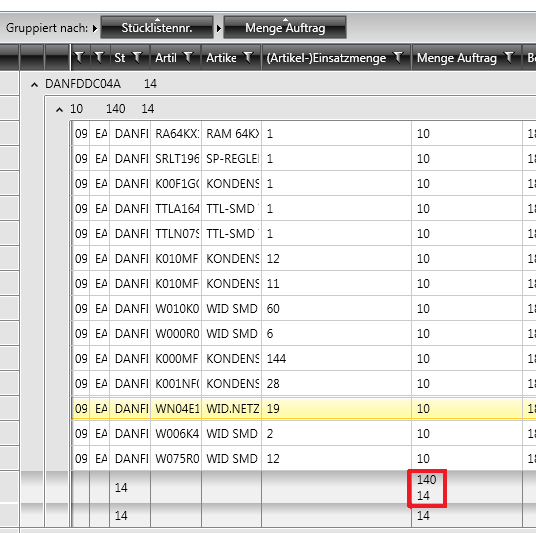
If I rotate the "important part", it works...
I hope you can explain me what happens here...
Regards
Arne Z.
for our program we use the MVVM-Pattern, so we have some "bindable propertiers". Such like the GroupDescriptorCollection (named DefaultGroupDesciptors) for the GridViews in our forms.
protected override void InitGroups(){ DefaultGroupDescriptors = new GroupDescriptorCollection(); GroupDescriptor Descriptor_STKNR = new GroupDescriptor(); Descriptor_STKNR.Member = "Field1";
CountFunction cound = new CountFunction(); Descriptor_STKNR.AggregateFunctions.Add(cound); DefaultGroupDescriptors.Add(Descriptor_STKNR); GroupDescriptor Descriptor_MEAUF = new GroupDescriptor(); Descriptor_MEAUF.Member ="Field2"; SumFunction sum = new SumFunction(); Descriptor_MEAUF.AggregateFunctions.Add(sum);
DefaultGroupDescriptors.Add(Descriptor_MEAUF); }
// execut at the binding:
foreach (GroupDescriptor Elem in DefaultGroupDescriptors)
{
Grid.GroupDescriptors.Add(Elem);
    AddAggregateFunctions(Grid, Elem);

}
private static void AddAggregateFunctions(RadGridView Grid, GroupDescriptor Elem){ if (Elem.AggregateFunctions != null) { foreach (AggregateFunction Function in Elem.AggregateFunctions) { Grid.Columns[Elem.Member].AggregateFunctions.Add(Function); } }}The important part:
Grid.GroupDescriptors.Add(Elem);
AddAggregateFunctions(Grid, Elem); This part doubles the AggregateFunctions from the first element:
(
...
CountFunction cound = new CountFunction(); Descriptor_STKNR.AggregateFunctions.Add(cound); DefaultGroupDescriptors.Add(Descriptor_STKNR);
... to the seond element
(
...
DefaultGroupDescriptors.Add(Descriptor_MEAUF);).
I think a picture is helpful:
If I rotate the "important part", it works...
foreach (GroupDescriptor Elem in newValue){ AddAggregateFunctions(ActGrid, Elem); ActGrid.GroupDescriptors.Add(Elem);}I hope you can explain me what happens here...
Regards
Arne Z.
1 answer
287 views
Hi,
We're interested in implementing your ImageEditorUI control, and have a few questions concerning its current/future customizability.
First, here's our scenario: within our software, we have a way in which to capture photos using a webcam/camera. We would then like to pass that captured image to your ImageEditorUI before saving the newly edited image to a database. One of the main editing features we'd like our users to see is the ability to "draw" on the loaded image, and possibly add their own text to the loaded image as well.
1. I noticed in the "Event when image is loaded" thread that it was mentioned there is an "upcoming" update to the control. When should we expect this new update, and is there anywhere you could point me to that lists what sort of changes/additions we can expect to see?
2. Are there any plans in the works to add a "drawing" tool to the control, or something in the like? If not, how would you recommend we go about adding this functionality?
3. Since we will be loading the image into the control automatically (without the help of the user), is there/will there be an option to remove the Open File button from the built-in UI?
4. Once the user is ready to save the file, we'd like to bypass the SaveDialogBox and have the file save to a non-user specifide location. Are there plans to make it possible to override this command with our own logic?
Obviously, we could use just the plain ImageEditor without the built-in UI to accomplish 3 and 4. However, we would then have to manually add all of the other tools in order to use them, which seems like a bit of a hassle if we can just remove one button and change the functionality of another.
Thank you for your time,
Kyle
We're interested in implementing your ImageEditorUI control, and have a few questions concerning its current/future customizability.
First, here's our scenario: within our software, we have a way in which to capture photos using a webcam/camera. We would then like to pass that captured image to your ImageEditorUI before saving the newly edited image to a database. One of the main editing features we'd like our users to see is the ability to "draw" on the loaded image, and possibly add their own text to the loaded image as well.
1. I noticed in the "Event when image is loaded" thread that it was mentioned there is an "upcoming" update to the control. When should we expect this new update, and is there anywhere you could point me to that lists what sort of changes/additions we can expect to see?
2. Are there any plans in the works to add a "drawing" tool to the control, or something in the like? If not, how would you recommend we go about adding this functionality?
3. Since we will be loading the image into the control automatically (without the help of the user), is there/will there be an option to remove the Open File button from the built-in UI?
4. Once the user is ready to save the file, we'd like to bypass the SaveDialogBox and have the file save to a non-user specifide location. Are there plans to make it possible to override this command with our own logic?
Obviously, we could use just the plain ImageEditor without the built-in UI to accomplish 3 and 4. However, we would then have to manually add all of the other tools in order to use them, which seems like a bit of a hassle if we can just remove one button and change the functionality of another.
Thank you for your time,
Kyle
Ivailo Karamanolev
Telerik team
answered
on
30 Aug 2011
3 answers
379 views
Hi,
The problem I have is that I am trying to host a windows form control in a floating pane. Once you start moving the pane around the control disappears. I am reasonably certain that it is because the floating pane window has AllowsTranparency=true. I would like to set it to false.
I tried creating a new style -
The problem I have is that I am trying to host a windows form control in a floating pane. Once you start moving the pane around the control disappears. I am reasonably certain that it is because the floating pane window has AllowsTranparency=true. I would like to set it to false.
I tried creating a new style -
<
Style x:Key="Win" TargetType="telerikDockingControls:RadPane">
<Setter Property="AllowsTransparency" Value="False"/>
</Style>
but I get the error message -
property was not found in RadePane.
could you tell me how to disable AllowsTransparency please?
Miroslav Nedyalkov
Telerik team
answered
on
30 Aug 2011





