or
0 answers
253 views
Since the Q3 2012 release we have identified a common scenario when Telerik Visual Studio extensions crash which leads to various problems when using any Telerik project template or wizard. The crash happens when you have multiple Telerik Visual Studio extensions with different versions (e.g. Q2 2012 SP2 and Q3 2012).
To resolve the issue you need to ensure that all Telerik Visual Studio extensions installed have the same version. If you are using Visual Studio 2010/2012 the easiest way is to upgrade all Telerik Visual Studio extensions to the latest version (which is the same) through the Visual Studio Extension Manager.
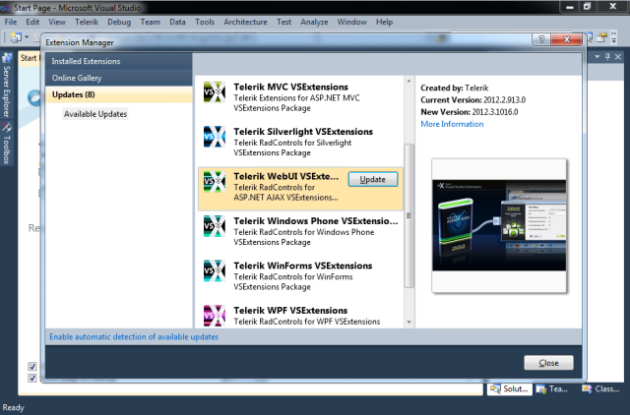
For Visual Studio 2008 you need to upgrade all Telerik products with Visual Studio extensions to the same version using the Telerik Trial Web Installer or the Telerik Control Panel.
We are currently resolving the issue on our side so that no crashes happen in future releases. Please excuse the inconvenience caused.
Kind regards,
Petar Raykov
The Telerik team
Update:
As some customers reported issues resulting in being unable to perform the above procedure or it not helping in all cases we created a very simple tool for cleaning all Telerik VS Extensions older than our latest version.
You can find the patch attached to this post. Make sure you do not have any running Visual Studio instances when you run the tool.
Note: Running the patch will resolve all version-conflict-related issues (including Visual Studio crashes outlined in this post), but will leave you without VSExtensions in case you have not installed our latest version. The easiest way to get those back is just getting the extensions once more through the Visual Studio Online Gallery.
To resolve the issue you need to ensure that all Telerik Visual Studio extensions installed have the same version. If you are using Visual Studio 2010/2012 the easiest way is to upgrade all Telerik Visual Studio extensions to the latest version (which is the same) through the Visual Studio Extension Manager.
For Visual Studio 2008 you need to upgrade all Telerik products with Visual Studio extensions to the same version using the Telerik Trial Web Installer or the Telerik Control Panel.
We are currently resolving the issue on our side so that no crashes happen in future releases. Please excuse the inconvenience caused.
Kind regards,
Petar Raykov
The Telerik team
Update:
As some customers reported issues resulting in being unable to perform the above procedure or it not helping in all cases we created a very simple tool for cleaning all Telerik VS Extensions older than our latest version.
You can find the patch attached to this post. Make sure you do not have any running Visual Studio instances when you run the tool.
Note: Running the patch will resolve all version-conflict-related issues (including Visual Studio crashes outlined in this post), but will leave you without VSExtensions in case you have not installed our latest version. The easiest way to get those back is just getting the extensions once more through the Visual Studio Online Gallery.

Telerik Admin
Top achievements
 Rank 1
 Iron
Iron
Rank 1
Iron
asked
on
18 Oct 2012
1 answer
161 views
Hi,
I encountered the following when using the FlagEnumEditor in my RadPropertyGrid:
If you unset the last remaining flag using the FlagEnumEditor (unchecking the last checked checkbox, NOT setting the None Flag (value zero) ), a binding error occurs and the data is not set correctly.
Error Message:
System.Windows.Data Error: 7 : ConvertBack cannot convert value '' (type 'String'). BindingExpression:Path=Flags; DataItem='MyClass' (HashCode=49455573); target element is 'FlagEnumEditor' (Name=''); target property is 'Value' (type 'String') FormatException:'System.FormatException: is not a valid value for MyFlags. ---> System.ArgumentException: Must specify valid information for parsing in the string.
... where MyClass is the type of the data context (Item of RadPropertyGrid) and MyFlags is the flags enum type.
If you just use the None Flag, everything works fine.
Suggested behavior: if the string value for converting back is empty, the flag enum should be set to zero.
I was going to create an Issue for this in the PITS, but there was no category for RadPropertyGrid...
Kind Regards
I encountered the following when using the FlagEnumEditor in my RadPropertyGrid:
If you unset the last remaining flag using the FlagEnumEditor (unchecking the last checked checkbox, NOT setting the None Flag (value zero) ), a binding error occurs and the data is not set correctly.
Error Message:
System.Windows.Data Error: 7 : ConvertBack cannot convert value '' (type 'String'). BindingExpression:Path=Flags; DataItem='MyClass' (HashCode=49455573); target element is 'FlagEnumEditor' (Name=''); target property is 'Value' (type 'String') FormatException:'System.FormatException: is not a valid value for MyFlags. ---> System.ArgumentException: Must specify valid information for parsing in the string.
... where MyClass is the type of the data context (Item of RadPropertyGrid) and MyFlags is the flags enum type.
If you just use the None Flag, everything works fine.
Suggested behavior: if the string value for converting back is empty, the flag enum should be set to zero.
I was going to create an Issue for this in the PITS, but there was no category for RadPropertyGrid...
Kind Regards

Maya
Telerik team

answered
on
18 Oct 2012
2 answers
327 views
Hi,
i'm using RadChartView in my WPF project.
this is my code:
My question is:
have RadChartView animations o plot effects? In older object RadChart, bar are plotted with a effect by default; is there a way to apply for RadChartView?
I'm using this Telerik version: 2012.2.912.40
Thanks.
Francesco
i'm using RadChartView in my WPF project.
this is my code:
<telerik:RadCartesianChart x:Name="chart" Grid.Row="1"> <telerik:RadCartesianChart.Palette> <ChartView:ChartPalette Name="PreparationPalette"> <ChartView:ChartPalette.GlobalEntries> <ChartView:PaletteEntry AdditionalFill="{x:Null}" AdditionalStroke="{x:Null}" Fill="{StaticResource passColor}" Stroke="{x:Null}" /> <ChartView:PaletteEntry AdditionalFill="{x:Null}" AdditionalStroke="{x:Null}" Fill="{StaticResource failColor}" Stroke="{x:Null}" /> <ChartView:PaletteEntry AdditionalFill="{x:Null}" AdditionalStroke="{x:Null}" Fill="{StaticResource reconstitutionColor}" Stroke="{x:Null}" /> </ChartView:ChartPalette.GlobalEntries> </ChartView:ChartPalette> </telerik:RadCartesianChart.Palette> <telerik:RadCartesianChart.HorizontalAxis> <ChartView:CategoricalAxis></ChartView:CategoricalAxis> </telerik:RadCartesianChart.HorizontalAxis> <telerik:RadCartesianChart.VerticalAxis> <ChartView:LinearAxis Visibility="Hidden" /> </telerik:RadCartesianChart.VerticalAxis> <telerik:RadCartesianChart.Series> <ChartView:BarSeries Name="BarPass" CategoryBinding="Label" ValueBinding="Value" ItemsSource="{Binding Mode=TwoWay, Path=RuntimePass}" CombineMode="{Binding CombineMode, Mode=TwoWay}" DataBindingComplete="BindingComplete" ShowLabels="True"> </ChartView:BarSeries> <ChartView:BarSeries Name="BarFail" CategoryBinding="Label" ValueBinding="Value" ItemsSource="{Binding Mode=TwoWay, Path=RuntimeFail}" CombineMode="{Binding Mode=TwoWay, Path=CombineMode}" DataBindingComplete="BindingComplete" ShowLabels="True"> </ChartView:BarSeries> <ChartView:BarSeries Name="BarReconsitution" CategoryBinding="Label" ValueBinding="Value" ItemsSource="{Binding Mode=TwoWay, Path=RuntimeReconstitution}" CombineMode="{Binding Path=CombineMode, Mode=TwoWay}" DataBindingComplete="BindingComplete" ShowLabels="True"> </ChartView:BarSeries> </telerik:RadCartesianChart.Series> </telerik:RadCartesianChart>My question is:
have RadChartView animations o plot effects? In older object RadChart, bar are plotted with a effect by default; is there a way to apply for RadChartView?
I'm using this Telerik version: 2012.2.912.40
Thanks.
Francesco
1 answer
111 views
Hi, i am trying to implement a version of ScheduleView similar to this example from your site: http://demos.telerik.com/silverlight/#ScheduleView/CustomStyles/GroupHeaderTemplate
i was wondering if it's possible to make the column separators act as GridSplitters so that the schedule column width could be adjustable by the viewer? my apologies if this is something easy that i'm overlooking (i'm new here). Thanks!
Matt.
i was wondering if it's possible to make the column separators act as GridSplitters so that the schedule column width could be adjustable by the viewer? my apologies if this is something easy that i'm overlooking (i'm new here). Thanks!
Matt.
Yana
Telerik team
answered
on
18 Oct 2012
3 answers
139 views
Hello Everyone,
I would like to know how to highlight appointments programmatically, I want to highlight all the appointment which are currently displayed.
I have aleady tried doing scheduView.SelectedAppointments.Add(), however I do not see any changes on UI :-(
Regards,
Kshamesh
I would like to know how to highlight appointments programmatically, I want to highlight all the appointment which are currently displayed.
I have aleady tried doing scheduView.SelectedAppointments.Add(), however I do not see any changes on UI :-(
Regards,
Kshamesh
Vladi
Telerik team
answered
on
18 Oct 2012
1 answer
250 views
Hi,
I am attempting to set the best view on radmap but I am getting a type conversion error when setting the rectangle to the information layer.
I am setting the information layer item source to records within a radgrid using:
Me.informationLayer.ItemsSource = Nothing
items = New ObservableCollection(Of MapItem)
Dim Item As PendingClass = TryCast(Me.PendingGrid.SelectedItem, PendingClass)
Dim LatLon() As String
If Not Item.LatLon Is Nothing Then
LatLon = Item.LatLon.Split(",")
Me.Vehtn.Visibility = Windows.Visibility.Visible
Dim foreground As Brush = New SolidColorBrush(Colors.Yellow)
Dim background As Brush = New SolidColorBrush(Colors.Red)
Dim Vtext As New TextBlock() With { _
.Text = Item.DelRegistration, _
.Background = background, _
.Foreground = foreground _
}
Me.items.Add(New MapItem(LatLon(0), LatLon(1), background, Vtext, Item.DateOfFix))
End If
Background = New SolidColorBrush(Colors.Green)
Dim text As New TextBlock() With { _
.Text = Item.DelName, _
.Background = Background, _
.Foreground = Foreground _
}
If Not Item.DelLatLon Is Nothing Then
Me.Locbtn.Visibility = Windows.Visibility.Visible
If Me.Vehtn.Visibility = Windows.Visibility.Visible Then Me.Distancebtn.Visibility = Windows.Visibility.Visible
LatLon = Item.DelLatLon.Split(",")
Me.items.Add(New MapItem(LatLon(0), LatLon(1), Background, text, Item.DelDate))
End If
Me.informationLayer.ItemsSource = items
I then attempt to set the map best view and I get the error:
‘+ ex {"Unable to cast object of type 'System.Windows.Controls.ItemCollection' to type 'System.Collections.Generic.IEnumerable`1[System.Object]'."} System.Exception’
If Me.informationLayer.Items.Count > 0 Then
Dim rect As LocationRect = Me.informationLayer.GetBestView(Me.GetIEnumerable(Me.informationLayer))
rect.MapControl = Me.radMap
Me.radMap.Center = rect.Center
Me.radMap.ZoomLevel = rect.ZoomLevel
End If
Regards,
Joe
Andrey
Telerik team
answered
on
18 Oct 2012
2 answers
104 views
Hello Telerik Team,
I would like to how I can accomplish this requirement,
Display the date in month view along with a icon1 or icon2 based on custom logic on GoToDayButton
I have attached the view as well, I am having been spending hard time to achieve this, however no success yet.
Appreciate your help in advance!
Regards,
Kshamesh
I would like to how I can accomplish this requirement,
Display the date in month view along with a icon1 or icon2 based on custom logic on GoToDayButton
I have attached the view as well, I am having been spending hard time to achieve this, however no success yet.
Appreciate your help in advance!
Regards,
Kshamesh
Kshamesh
Top achievements
Rank 1
Rank 1
answered
on
18 Oct 2012
0 answers
115 views
I've tried printing my grid using the method in the GridView printing demo. My grid is wider than one page, but when printing it, it gets squeezed into one page. Is it possible to print the grid using it's actual width and spread it over multiple pages?
10 answers
692 views
Hi,
I am trying to use TIleView in a simple way, as you can see below. I just need to stack each item (label) according to the number of columns that I set, and allow user to select one item in it.
Problems:
1) When items are loaded, and I want to select a particular item, I need to click twice on it: one time to select the TileView itself, and another time to select an item. It is expected to be able to select an item by only clicking once. I cannot just put focus on the tiles, since there are some other controls on this view that also can have focus.
2) If I click somewhere on the TileView space that is not occupied by items, currently selected item will be deselected. I would like to disable this behavior
3) If I click on a selected item, it will be deselected. I would like to disable this behavior
Regards,
Goran
I am trying to use TIleView in a simple way, as you can see below. I just need to stack each item (label) according to the number of columns that I set, and allow user to select one item in it.
<telerik:RadTileView Grid.Column="1" ColumnsCount="5" ColumnWidth="*" ContentTemplate="{StaticResource tileContentTemplate}" IsItemDraggingEnabled="False" IsSelectionEnabled="True" IsSynchronizedWithCurrentItem="True" ItemsSource="{Binding List}" ItemTemplate="{StaticResource tileHeaderTemplate}" MaximizeMode="Zero" RowHeight="140" SelectedItem="{Binding SelectedItem}" />Problems:
1) When items are loaded, and I want to select a particular item, I need to click twice on it: one time to select the TileView itself, and another time to select an item. It is expected to be able to select an item by only clicking once. I cannot just put focus on the tiles, since there are some other controls on this view that also can have focus.
2) If I click somewhere on the TileView space that is not occupied by items, currently selected item will be deselected. I would like to disable this behavior
3) If I click on a selected item, it will be deselected. I would like to disable this behavior
Regards,
Goran
Zarko
Telerik team
answered
on
17 Oct 2012
3 answers
114 views
Hi,
I'm new to Telerik controls and WPF for that matter. I have an array of uint, always will have 2048 items and I'd like to plot a line chart using the ChartView. I cannot figure out the right combination of what type of data series and how to format the axis. This array will be updating periodically, so is there away for the chart to get updated when the array does? Also is there a way to fill in the area beneath the line chart?
Looking for some code snippets, or a sample project. We are looking to buy a WPF toolkit in the very near future for up to 5 developers.
Thanks!
I'm new to Telerik controls and WPF for that matter. I have an array of uint, always will have 2048 items and I'd like to plot a line chart using the ChartView. I cannot figure out the right combination of what type of data series and how to format the axis. This array will be updating periodically, so is there away for the chart to get updated when the array does? Also is there a way to fill in the area beneath the line chart?
Looking for some code snippets, or a sample project. We are looking to buy a WPF toolkit in the very near future for up to 5 developers.
Thanks!







